
网格中平行四边形的面积计算(进阶)
几何画板及绘图内容加载中,请稍等……
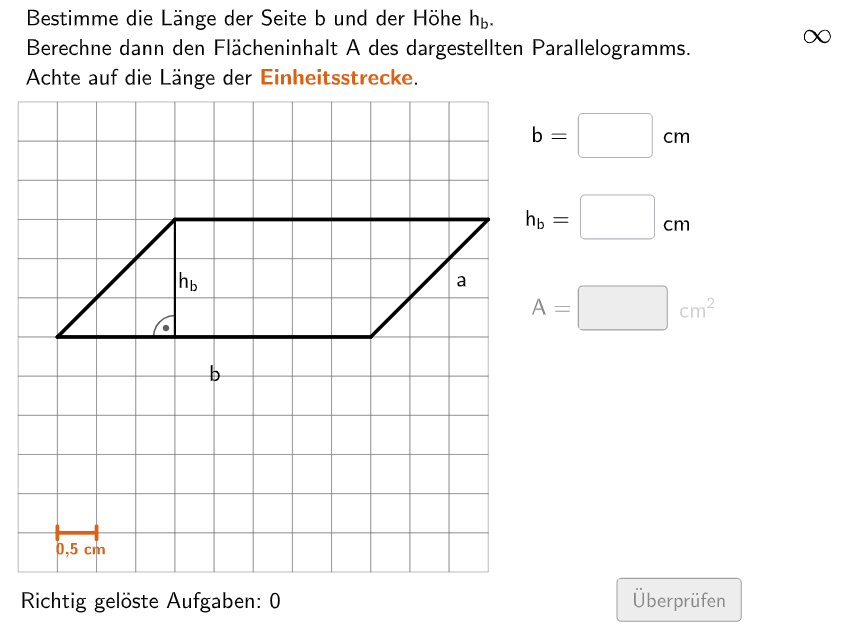
本范例演示在网格坐标系中计算平行四边形面积的方法。核心数学概念包括平行四边形的面积公式(底×高)及其证明、网格坐标的几何意义、向量叉积与面积的关系。作图要点:利用Polygon命令构造平行四边形,通过Segment绘制辅助线展示高和底的关系,使用Translate/Midpoint命令实现图形的平移和中点定位,借助Random和Shuffle命令生成随机坐标实现题目随机化,配合InputBox实现交互式输入验证。适合5-6年级学生,可用于巩固四边形面积公式的理解与实际应用,培养数形结合的思维能力。
GeoGebra 命令及参数
Shuffle(Sequence[Random[7, coordheight - 2], m, 1, 100]) → randomNosForX, {7, 8, 8, 8, 8, 10, 7, 8, 8, 9, 7, 8, 7, 10, 8, 7, 7, 7, 10, 7, 7, 7, 10, 7, 7, 8, 7, 7, 7, 8, 7, 7, 7, 10, 10, 9, 10, 10, 10, 9, 8, 8, 8, 9, 8, 7, 8, 8, 9, 9, 7, 7, 9, 7, 7, 9, 8, 8, 9, 8, 7, 9, 7, 7, 9, 10, 9, 7, 8, 9, 8, 7, 9, 8, 9, 7, 10, 10, 9, 7, 7, 7, 7, 9, 10, 7, 9, 9, 8, 9, 8, 10, 9, 8, 9, 7, 7, 9, 9, 8}Element(randomNosForX, Mod[questionCount, 100] + 1) → numXShuffle(Sequence[Random[4, coordwidth - 2], m, 1, 100]) → randomNosForY, {7, 10, 7, 9, 6, 8, 7, 9, 4, 10, 9, 4, 8, 4, 6, 10, 10, 7, 7, 6, 8, 5, 9, 9, 9, 9, 6, 9, 6, 8, 9, 5, 10, 9, 8, 10, 8, 4, 9, 7, 10, 6, 7, 7, 6, 8, 5, 4, 10, 10, 9, 10, 9, 6, 10, 8, 7, 7, 5, 10, 6, 8, 6, 7, 4, 7, 5, 6, 4, 6, 8, 9, 4, 6, 9, 10, 5, 8, 10, 4, 10, 6, 5, 6, 10, 10, 8, 6, 10, 8, 4, 6, 7, 5, 10, 7, 8, 7, 6, 10}Element(randomNosForY, Mod[questionCount, 100] + 1) → numYTextfield(input1) → InputBox1Textfield(input2) → InputBox2Shuffle(Sequence[i, i, 6, 12] \ {axold}) → AxList, {12, 10, 9, 11, 8, 6, 7}Shuffle(Sequence[i, i, 1, 12] \ {ax - 2, ax - 1, ax, ax + 1, ax + 2}) → CxList, {1, 8, 4, 7, 6, 9, 2, 5, 3}Shuffle(Sequence[i, i, 2, abs(cx - ax)] \ {abs(cx - ax)}) → LaengeaList, {8, 3, 7, 5, 2, 6, 4, 9, 10}Shuffle(Sequence[i, i, 1, 9] \ {ayold}) → AyList, {9, 4, 2, 7, 6, 8, 3, 1, 5}Shuffle(Sequence[i, i, 1, 12] \ {ay - 2, ay - 1, ay, ay + 1, ay + 2}) → CyList, {6, 1, 12, 3, 2, 5, 4}If(cx < ax, C + (size * (laengea, 0)), C - (size * (laengea, 0))) → BIf(cx < ax, A - (size * (laengea, 0)), A + (size * (laengea, 0))) → DPolygon(C, B, A, D) → v2, j, k, l, mOrthogonalLine(D, l) → nIntersect(n, Line[C, B]) → ESegment(D, E) → pShuffle({0.5, 1.5, 2, 3}) → EinheitsLList, {0.5, 2, 1.5, 3}Polygon(PtopLeftCornerFeedback, PtopRightCornerFeedback, PbottomRightCornerFeedback, PbottomLeftCornerFeedback) → rectangleCorrect, rectangleCorrectS3, rectangleCorrectS4, rectangleCorrectS2, rectangleCorrectS1Append(true, Sequence[If[randomNosForX(i) ≟ randomNosForX(i - 1), false, true], i, 2, 100]) → stayXAppend(true, Sequence[If[randomNosForY(i) ≟ randomNosForY(i - 1), false, true], i, 2, 100]) → stayYRemove(Sequence[If[stayX(i), randomNosForX(i), 0], i, 1, 100], Sequence[0, i, 1, 100]) → randomNosForXwithoutRepeatRemove(Sequence[If[stayY(i), randomNosForY(i), 0], i, 1, 100], Sequence[0, i, 1, 100]) → randomNosForYwithoutRepeatElement(randomNosForXwithoutRepeat, Mod[questionCount, Length[randomNosForXwithoutRepeat]] + 1) → numXwithoutRepeatElement(randomNosForYwithoutRepeat, Mod[questionCount, Length[randomNosForYwithoutRepeat]] + 1) → numYwithoutRepeatDefined(input3) → fixedFlatten(Sequence[Sequence[O + (m * (size, 0)) + (j * (0, size)), m, 0, coordwidth - 1], j, 0, coordheight - 1]) → listPointsZip(Polygon[P, P + (0, size), P + (0, size) + (size, 0), P + (size, 0)], P, listPoints) → listCoordsSegment(P1, P3) → esRandom(2, numX - 2) → propSegment(P4, P2) → fsSegment(G1, G2) → gTranslate(Segment[(0, -0.1), (0, 0.1)], G1) → hTranslate(Segment[(0, -0.1), (0, 0.1)], G2) → iIntersect(es, fs) → STextfield(input3) → InputBox3Shuffle({1, 2}) → ModusList, {2, 1}If(y(C) < y(D), Midpoint[C, B], Midpoint[D, A]) → MittelpunktUntenIf(x(A) > x(D), Midpoint[A, B], Midpoint[D, C]) → MittelpunktRechtsMidpoint(D, B) → MText(BeschTextb, F, false, true, 0, 0) → Text3Text(BeschTexta, G, false, true, 0, 0) → Text4If(x(E) > x(B) ∧ y(B) > y(A) ∨ x(B) < x(E) ∧ y(B) < y(A), Midpoint[p] - (0.2, 0), Midpoint[p] + (0.2, 0)) → HText(BeschTexth, H, false, true, 0, 0) → Text8Segment(C, E) → hintCESegment(B, E) → hintBEAngle(A, D, E) → αAngle(C, E, D) → βAngle(D, E, C) → γAngle(E, D, A) → δDistance(H, F) → diffIf(x(A) < x(D), Midpoint[A, B], Midpoint[D, C]) → MittelpunktLinksText(BeschTextb, I, false, true, 0, 0) → Text16
AI 绘图提示语参考
绘制一个平行四边形,使用坐标网格。首先,随机选择两个点作为平行四边形的底边和高,然后构造平行四边形的四个顶点。接着,画出底边和高的辅助线,标出平行四边形的面积公式,并计算面积。最后,添加一些辅助线和角度标记,帮助理解平行四边形的几何关系。
以上提示语为根据原始绘图命令整理而来,仅供参考。