
Two Rotations
Loading the math board and drawing, please wait…
In collections
Symmetry, Transformation and Tessellation
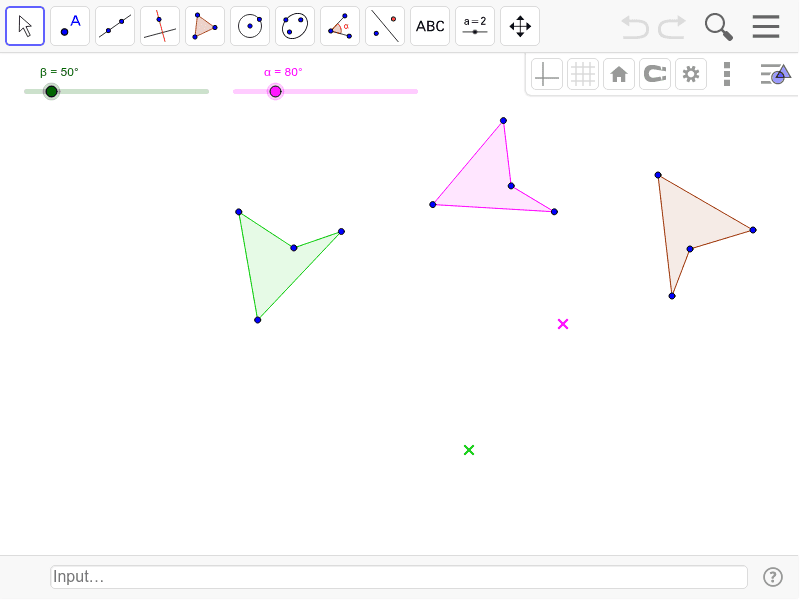
This example demonstrates the effect of applying two rotations to a shape. It involves core mathematical concepts such as transformations, polygons, trigonometric functions, and coordinate geometry. The construction uses GeoGebra commands like Polygon and Rotate. Suitable for high school geometry transformation lessons and exploration.
GeoGebra Commands & Parameters
Polygon(A, B, C, D) → poly1, a, b, c, dRotate(A, α, E) → A'Rotate(B, α, E) → B'Rotate(C, α, E) → C'Rotate(D, α, E) → D'Polygon(A', B', C', D') → poly1', a', b', c', d'Rotate(A', β, F) → A''Rotate(B', β, F) → B''Rotate(C', β, F) → C''Rotate(D', β, F) → D''Polygon(A'', B'', C'', D'') → poly1'', a'', b'', c'', d''
AI Drawing Prompt Reference
Draw a quadrilateral, rotate it around a point by a specified angle to get a new quadrilateral, then rotate the new quadrilateral around another point by a specified angle to get the final quadrilateral, showing the effect of two rotations.
The prompt above was compiled from the original drawing commands and is for reference only.