
Triangle Area Investigation
Loading the math board and drawing, please wait…
In collections
Area of shapes
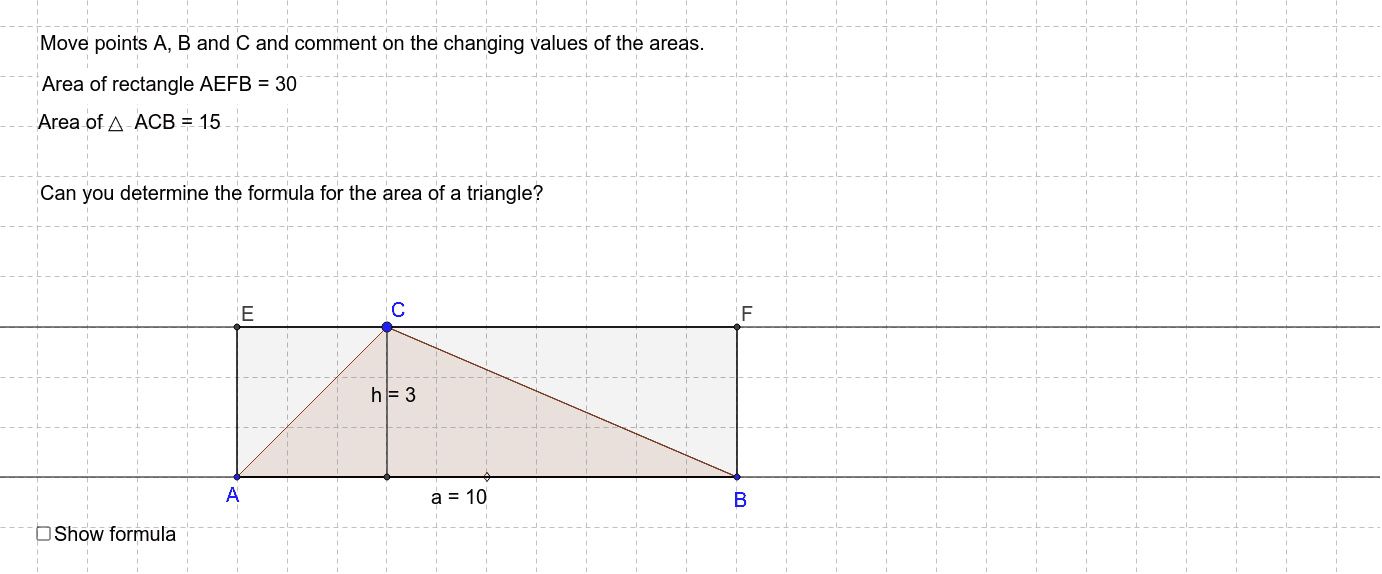
This example demonstrates how to calculate the area of a triangle interactively. It involves core math concepts like triangle area formulas, coordinate geometry, and geometric construction. Construction highlights include using commands like Segment, Line, Polygon, OrthogonalLine, Intersect to draw the triangle and auxiliary lines, and calculating side lengths and heights. Suitable for middle school and above students to learn triangle area calculation methods.
GeoGebra Commands & Parameters
Segment(A, B) → aLine(C, a) → bSegment(C, A) → cSegment(C, B) → dPolygon(A, C, B) → poly1, b_1, a_1, c_1Line(A, B) → eOrthogonalLine(C, e) → fIntersect(e, f) → DSegment(C, D) → hOrthogonalLine(A, b) → gOrthogonalLine(B, b) → iIntersect(g, b) → EIntersect(i, b) → FSegment(A, E) → jSegment(E, F) → kSegment(F, B) → lSegment(B, A) → mPolygon(A, E, F, B) → poly2, a_2, e_1, f_1, b_2
AI Drawing Prompt Reference
Draw a triangle ABC and show the process of calculating its area. First, draw the triangle ABC, then draw a perpendicular line from vertex C to the base AB, with the foot at D. Next, draw perpendicular lines from A and B to the opposite sides, meeting at points E and F respectively. Finally, color the triangle ABC and the quadrilateral AEBF to visually represent the area calculation method.
The prompt above was compiled from the original drawing commands and is for reference only.