
Thales Practice 1: Dynamic Exploration of Right Triangles in a Circle
Loading the math board and drawing, please wait…
In collections
Thales' Theorem
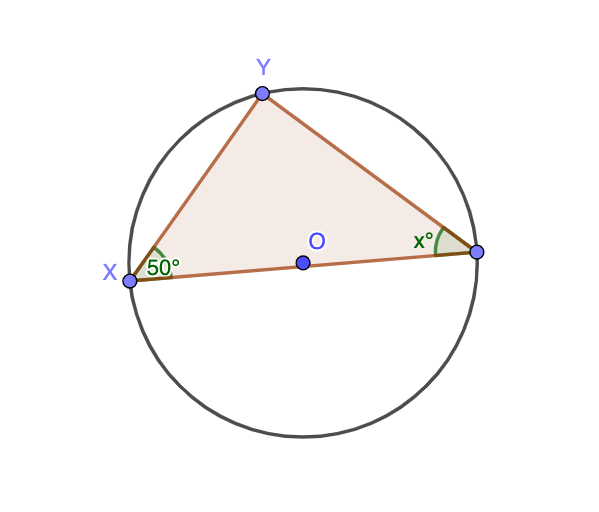
This GeoGebra example demonstrates Thales' theorem: any angle inscribed in a semicircle is a right angle. It constructs a triangle with the diameter as its hypotenuse and dynamically measures the angles. Core math concepts include circle properties, inscribed angle theorem, right triangle identification, and angle measurement. Construction uses the Circle command to draw the circle, Point to place points on the circle, Polygon to form the triangle, and Angle to label and measure angles α and β, with text objects displaying values. Suitable for middle school geometry to visualize why the angle subtended by a diameter is always 90°, and for high school review of circle-triangle relationships. By dragging the moving point on the circle, students can observe angle changes and verify the theorem, fostering dynamic geometric thinking.
GeoGebra Commands & Parameters
Circle(O, B) → cPoint(c) → XPoint(c) → YPoint(c) → ZPolygon(X, Y, Z) → t1, d, a, c_1Angle(Z, X, Y) → αAngle(Y, Z, X) → β
AI Drawing Prompt Reference
Draw a circle and select three points on it to form a triangle. One side of the triangle is the diameter, and the other two points can be moved. Label the angles in the triangle, especially the angle subtended by the diameter. Students can drag the points to observe angle changes and verify that the angle subtended by the diameter is always 90 degrees.
The prompt above was compiled from the original drawing commands and is for reference only.