
Symmedian Point in Triangles
Loading the math board and drawing, please wait…
In collections
Besondere Punkte/Special Points
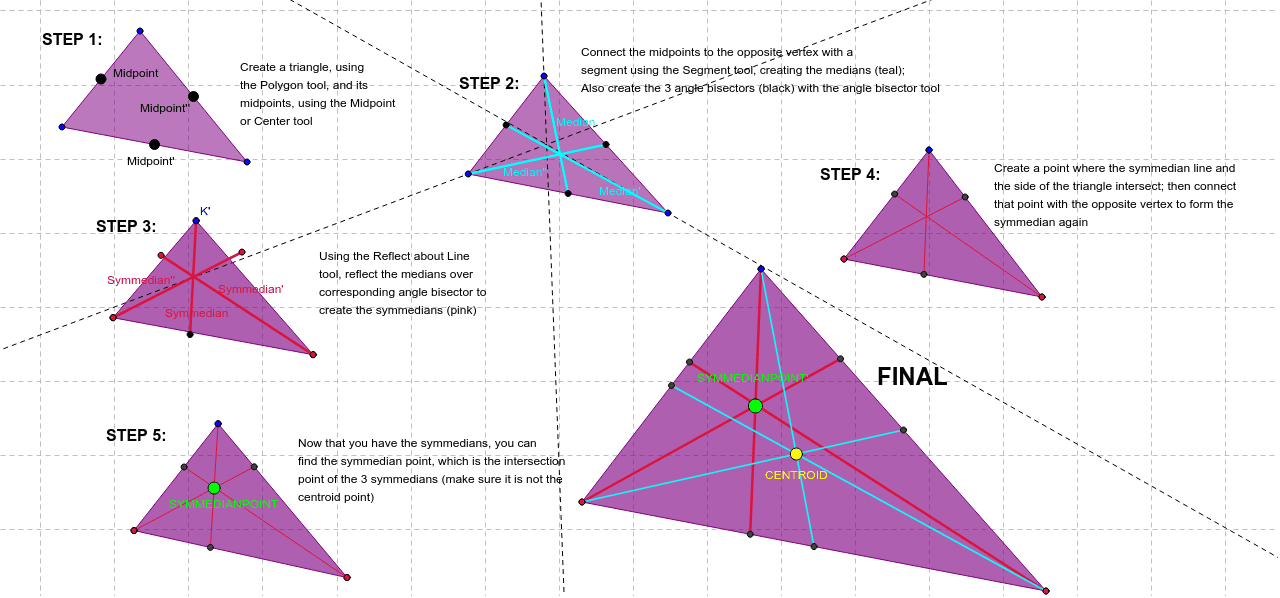
This example demonstrates how to construct the symmedian point in a triangle. Key math concepts include symmedians, midpoints, angle bisectors, and intersections. GeoGebra commands used are Polygon, Midpoint, AngularBisector, Segment, Point, Mirror, and Intersect. Suitable for high school geometry education and construction practice.
GeoGebra Commands & Parameters
Polygon(M, N, O) → poly3, o, m_1, nMidpoint(m_1) → Midpoint''Midpoint(o) → MidpointMidpoint(n) → Midpoint'Polygon(P, Q, R) → poly4, r, p, qMidpoint(r) → SMidpoint(q) → TMidpoint(p) → UAngularBisector(P, R, Q) → c_1AngularBisector(Q, P, R) → d_1Segment(Q, T) → Median''Segment(U, P) → MedianSegment(S, R) → Median'AngularBisector(P, Q, R) → sPolygon(J, K, L) → poly2, l_1, j_1, k_1Point(k_1) → WSegment(W, K) → jPoint(l_1) → GSegment(G, L) → kAngularBisector(J, K, L) → a_1AngularBisector(J, L, K) → b_1AngularBisector(K, J, L) → e_1Mirror(W, a_1) → W'Mirror(K, a_1) → K'Segment(W', K') → SymmedianMirror(J, e_1) → J'Mirror(G, b_1) → G'Mirror(L, b_1) → L'Segment(G', L') → Symmedian'Midpoint(j_1) → B_1Segment(J, B_1) → tMirror(J, e_1) → J'_3Mirror(B_1, e_1) → ZSegment(J'_3, Z) → Symmedian''Polygon(J_1, K_1, L_1) → poly2_1, l_2, j_2, k_2Point(k_2) → W_1Segment(W_1, K_1) → j_3Point(l_2) → G_1Segment(G_1, L_1) → k_3AngularBisector(J_1, K_1, L_1) → a_3AngularBisector(J_1, L_1, K_1) → b_2AngularBisector(K_1, J_1, L_1) → e_2Mirror(W_1, a_3) → W'_1Mirror(K_1, a_3) → K'_1Segment(W'_1, K'_1) → Symmedian_1Mirror(G_1, b_2) → G'_1Mirror(L_1, b_2) → L'_1Segment(G'_1, L'_1) → Symmedian'_1Midpoint(j_2) → B_2Segment(J_1, B_2) → t_1Mirror(J_1, e_2) → J'_4Mirror(B_2, e_2) → Z_1Segment(J'_4, Z_1) → t'_1Intersect(l_2, Symmedian'_1) → HIntersect(k_2, Symmedian_1) → VIntersect(j_2, t'_1) → A_1Segment(K_1, V) → f_1Segment(J_1, A_1) → g_1Segment(H, L_1) → h_1Polygon(J_2, K_2, L_2) → poly2_2, l_3, j_4, k_4Point(k_4) → W_2Segment(W_2, K_2) → j_5Point(l_3) → G_2Segment(G_2, L_2) → k_5AngularBisector(J_2, K_2, L_2) → a_2AngularBisector(J_2, L_2, K_2) → b_3AngularBisector(K_2, J_2, L_2) → e_3Mirror(W_2, a_2) → W'_2Mirror(K_2, a_2) → K'_2Segment(W'_2, K'_2) → Symmedian_2Mirror(G_2, b_3) → G'_2Mirror(L_2, b_3) → L'_2Segment(G'_2, L'_2) → Symmedian'_2Midpoint(j_4) → B_3Segment(J_2, B_3) → t_2Mirror(J_2, e_3) → J'_1Mirror(B_3, e_3) → Z_2Segment(J'_1, Z_2) → t'_2Intersect(l_3, Symmedian'_2) → H_1Intersect(k_4, Symmedian_2) → V_1Intersect(j_4, t'_2) → A_2Segment(K_2, V_1) → f_2Segment(J_2, A_2) → g_2Segment(H_1, L_2) → h_2Intersect(f_2, g_2) → SYMMEDIANPOINTPolygon(J_3, K_3, L_3) → poly2_3, l_4, j_6, k_6Point(k_6) → W_3Segment(W_3, K_3) → j_7Point(l_4) → G_3Segment(G_3, L_3) → k_7AngularBisector(J_3, K_3, L_3) → a_4AngularBisector(J_3, L_3, K_3) → b_4AngularBisector(K_3, J_3, L_3) → e_4Mirror(W_3, a_4) → W'_3Mirror(K_3, a_4) → K'_3Segment(W'_3, K'_3) → Symmedian_3Mirror(G_3, b_4) → G'_3Mirror(L_3, b_4) → L'_3Segment(G'_3, L'_3) → Symmedian'_3Midpoint(j_6) → B_4Segment(J_3, B_4) → t_3Mirror(J_3, e_4) → J'_2Mirror(B_4, e_4) → Z_3Segment(J'_2, Z_3) → t'_3Intersect(l_4, Symmedian'_3) → H_2Intersect(k_6, Symmedian_3) → V_2Intersect(j_6, t'_3) → A_3Segment(K_3, V_2) → f_3Segment(J_3, A_3) → g_3Segment(H_2, L_3) → h_3Intersect(f_3, g_3) → SYMMEDIANPOINT'Midpoint(l_4) → BMidpoint(k_6) → CMidpoint(j_6) → DSegment(K_3, C) → aSegment(J_3, D) → bSegment(B, L_3) → cIntersect(a, b) → CENTROID
AI Drawing Prompt Reference
Draw a triangle with labeled vertices. Find the midpoints and angle bisectors of each side, connect each vertex to the midpoint of the opposite side to form medians, and find the intersections of the angle bisectors with the opposite sides to form angle bisectors. The intersection of the medians is the symmedian point. Draw the symmedian lines from the vertices to the intersections, and highlight the quadrilateral and pentagon formed by the symmedian point and the angle bisector intersections.
The prompt above was compiled from the original drawing commands and is for reference only.