
Surface Area of a Cylinder
Loading the math board and drawing, please wait…
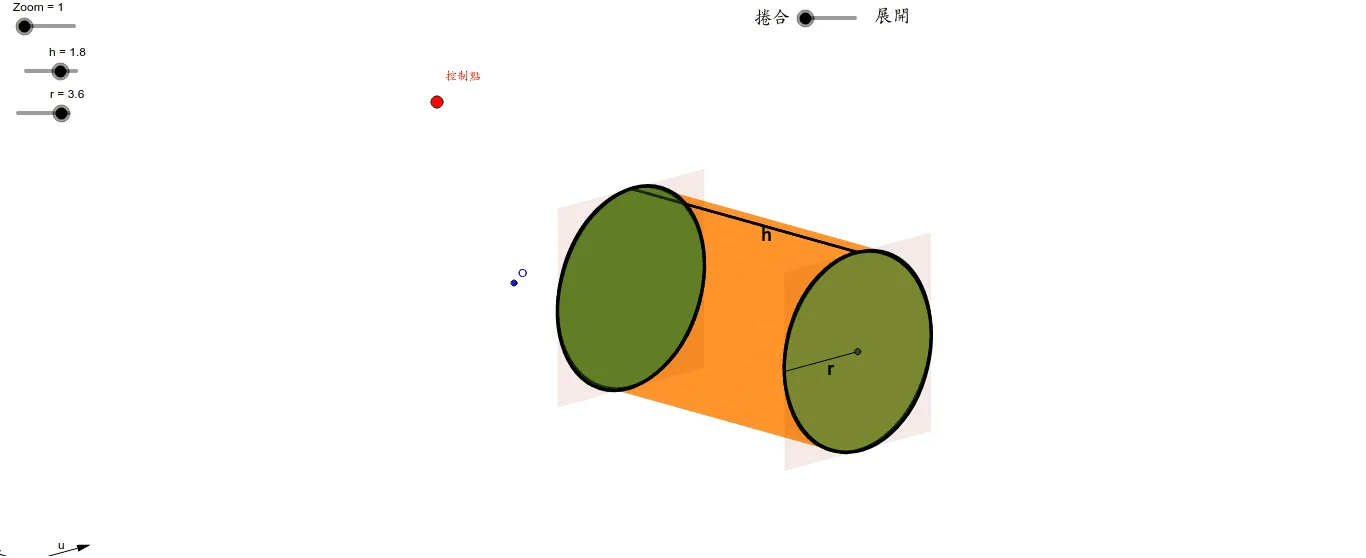
This applet demonstrates the calculation and geometric construction of the surface area of a cylinder. Users can control the base radius and height of the cylinder through interactive parameters, and the applet dynamically displays the lateral surface unfolding along with the top and bottom circular bases using vector translations and other geometric transformations. The lateral surface unfolds into a rectangle whose dimensions correspond to the height of the cylinder and the circumference of the base circle, providing a clear visual link between the three-dimensional solid and its two-dimensional net. By observing how the radius and height affect the unfolding pattern in real time, students can see directly how each component contributes to the total surface area, leading naturally to the derivation of the formula: the sum of the areas of the two circular bases (2πr²) and the rectangular lateral surface (2πrh). This hands-on, visual approach helps learners build an intuitive understanding of the relationship between 3D solids and their 2D net representations, a concept that is often challenging when taught through static diagrams alone. The applet is well suited for solid geometry instruction, allowing teachers to animate the unfolding process step by step and inviting students to explore how changing the dimensions reshapes the net while preserving the underlying mathematical relationships. It encourages active discovery rather than rote memorization, making the surface area formula feel like a natural consequence of geometric reasoning rather than an abstract equation to be recalled under pressure.
GeoGebra Commands & Parameters
Vector(B_1, Y) → vVector(B_1, Z) → wVector(B_1, X) → uOrthogonalLine(控制點, yAxis) → aOrthogonalLine(控制點, xAxis) → bDilate(D, t, A) → TTranslate(T, Vector[r / 3.141592653589793 * w]) → T'_1Translate(T'_1, Vector[A, B]) → T''_1Sequence(Segment[If[i / n - t < 0, A - i / n * 2 * r * u, T'_1 - r / 3.141592653589793 * cos(((i / n - t) * 360)°) * w - r / 3.141592653589793 * sin(((i / n - t) * 360)°) * u], If[i / n - t < 0, B - i / n * 2 * r * u, T''_1 - r / 3.141592653589793 * cos(((i / n - t) * 360)°) * w - r / 3.141592653589793 * sin(((i / n - t) * 360)°) * u]], i, 0, n) → liste1Segment(D, A) → ePoint(e) → E_2AffineRatio(A, D, E_2) → t'If(t' - t < 0, E_2, T'_1 - r / 3.141592653589793 * cos(((t' - t) * 360)°) * w - r / 3.141592653589793 * sin(((t' - t) * 360)°) * u) → PLocus(P, E_2) → lieu1Translate(P, Vector[A, B]) → P'Locus(P', E_2) → lieu2Midpoint(E_2, A) → FElement(liste1, 1) → fElement(liste1, n + 1) → h_1Sequence(If[i / n - t < 0, A - i / n * 2 * r * u, T'_1 - r / 3.141592653589793 * cos(((i / n - t) * 360)°) * w - r / 3.141592653589793 * sin(((i / n - t) * 360)°) * u], i, 0, n) → liste2Sequence(If[i / n - t < 0, B - i / n * 2 * r * u, T''_1 - r / 3.141592653589793 * cos(((i / n - t) * 360)°) * w - r / 3.141592653589793 * sin(((i / n - t) * 360)°) * u], i, 0, n) → liste3Sequence(Polygon[Element[liste3, i], Element[liste3, i + 1], Element[liste2, i + 1], Element[liste2, i]], i, 0, n) → liste4Mirror(F, O) → F'Midpoint(h_1) → HMirror(T, H) → T'Polygon(G, L, M, I) → poly2, g_2, l, m, i_1Midpoint(g_2) → NMidpoint(m) → Q_1Midpoint(l) → RMidpoint(R, Q_1) → SMidpoint(N, Q_1) → UMidpoint(R, S) → V_1Midpoint(V_1, U) → WMidpoint(W, V_1) → A_1Mirror(A_1, V_1) → C_1Conic(Q_1, C_1, R, N, T) → pDilate(D_1, t, B) → EPolygon(F_1, V, E_1, G_1) → poly1, f_1, v_1, e_1, g_1Conic(Q_1, C_1, R, N, T) → qMidpoint(F_1, E_1) → CMidpoint(g_1) → J_1Midpoint(e_1) → K_1Midpoint(K_1, J_1) → L_1Midpoint(L_1, K_1) → M_1Midpoint(C, M_1) → N_1Midpoint(N_1, M_1) → O_1Mirror(O_1, M_1) → P_1Midpoint(v_1) → R_1Conic(E, J_1, P_1, K_1, R_1) → sConic(E, J_1, P_1, K_1, R_1) → c_1Midpoint(f) → S_1Segment(C, J_1) → iMidpoint(i) → I_1
AI Drawing Prompt Reference
Draw a demonstration of the surface area of a cylinder. Users can interactively control the base radius and height of the cylinder. The figure should dynamically display the lateral surface unfolded into a rectangle, where the width corresponds to the circumference of the base circle and the height corresponds to the cylinder's height. Also show the top and bottom circular bases. Observe how the radius and height affect the shape and size of the unfolded pattern. The diagram should clearly illustrate the relationship between the 3D solid and its 2D net, helping to understand the formula for surface area: the sum of the areas of the two circular bases (2πr²) and the rectangular lateral surface (2πrh).
The prompt above was compiled from the original drawing commands and is for reference only.