
Square to Rectangle Same Area
Loading the math board and drawing, please wait…
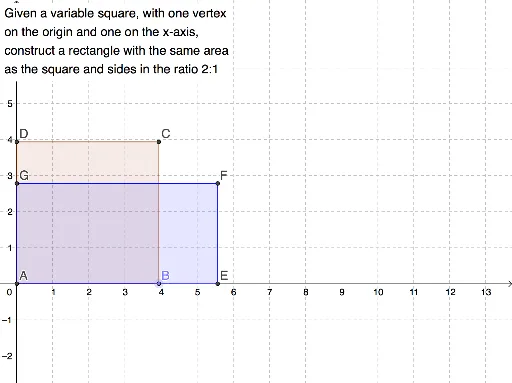
This example demonstrates constructing a square and a rectangle with equal areas using GeoGebra. Key math concepts include area calculation, geometric properties of rectangles and squares, and the application of LCM and GCD. The construction involves commands like Intersect, Point, and Polygon. Suitable for middle school students and above to explore geometric constructions, area concepts, and connections to Pythagorean Theorem and Fractal Geometry.
GeoGebra Commands & Parameters
Intersect(xAxis, yAxis) → APoint(xAxis) → BPolygon(A, B, 4) → poly1, a, b, c, d, C, DPolygon(A, E, F, G) → q1, a_1, e, f, g
AI Drawing Prompt Reference
Draw a square and a rectangle of equal area to illustrate their geometric relationship. Start by identifying the intersection point of the coordinate axes, then draw a line segment from this point to form one side of the square. Next, calculate the area of the square and use this to construct a rectangle with the same area, ensuring the sides are proportionally adjusted. Label the key points and shapes clearly.
The prompt above was compiled from the original drawing commands and is for reference only.