
Sine Law Demonstration: Visualizing Triangle Side-Angle Ratios
Loading the math board and drawing, please wait…
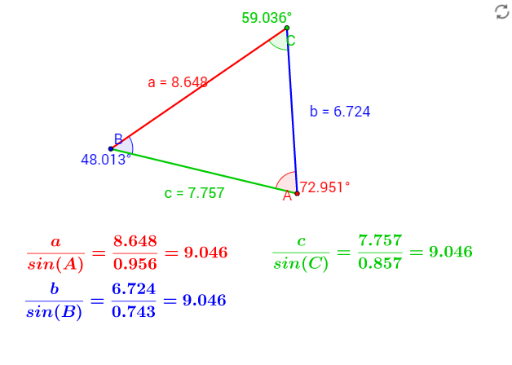
This GeoGebra example dynamically demonstrates the Sine Law, showing that in any triangle, the ratio of a side length to the sine of its opposite angle is constant. It visually confirms that for sides a, b, c and opposite angles α, β, γ, the equality a/sinα = b/sinβ = c/sinγ holds. The construction uses the Segment command to draw the three sides of the triangle, the Angle command to mark the interior angles, and text objects (text1, text2, text3) to display side lengths, angle measures, or their ratios. By dragging vertices A, B, and C, learners can observe how side lengths and angles change while the ratio remains invariant, reinforcing the universality of the Sine Law. This resource is ideal for high school geometry or trigonometry classes, as well as introductory college review, bridging visual intuition with algebraic formulation.
GeoGebra Commands & Parameters
Segment(B, C) → aSegment(A, C) → bSegment(A, B) → cAngle(A, B, C) → αAngle(B, C, A) → βAngle(C, A, B) → γ
AI Drawing Prompt Reference
Draw a triangle ABC, use the segment command to draw sides a, b, and c, then use the angle command to measure angles α, β, and γ. By dragging vertices A, B, and C, observe how the side lengths and angles change while maintaining the ratio a/sinα = b/sinβ = c/sinγ.
The prompt above was compiled from the original drawing commands and is for reference only.