
Similar Triangles by gklwong
Loading the math board and drawing, please wait…
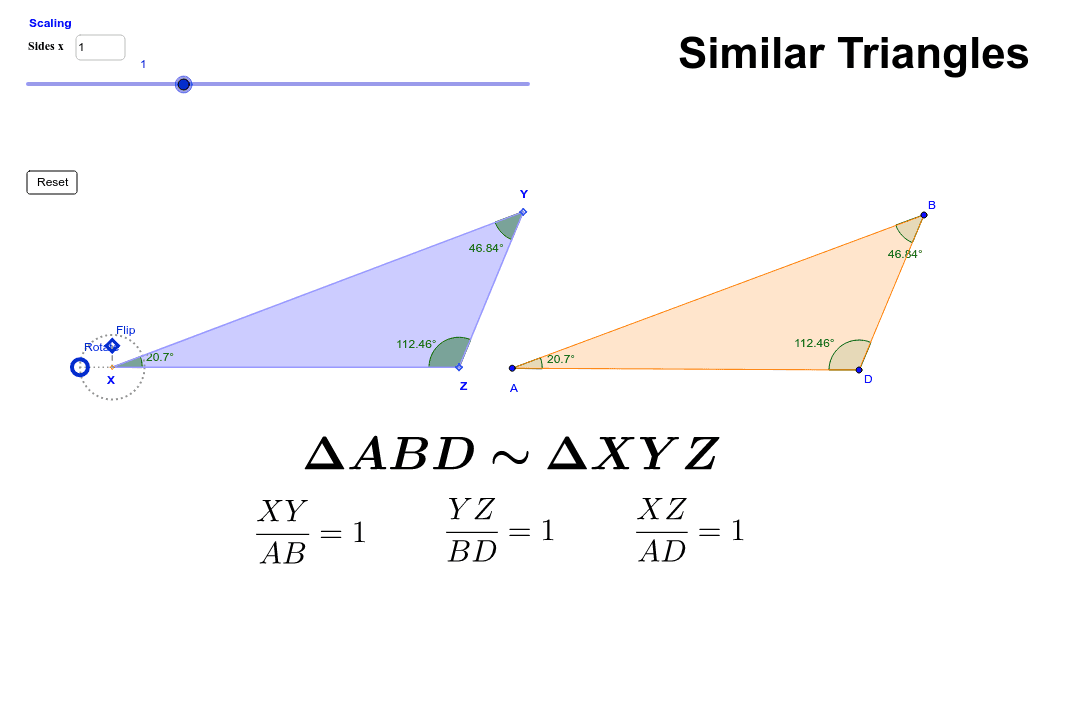
This example demonstrates the properties and criteria of similar triangles. It involves core concepts like triangle similarity, angle relationships, and coordinate geometry. Construction highlights include using commands like Polygon, AngularBisector, Intersect, along with objects such as Circle, Segment, and Point for transformations and measurements. Suitable for high school mathematics teaching to visually understand geometric transformations and proofs of similar triangles.
GeoGebra Commands & Parameters
Polygon(A, B, D) → poly1, c, a, bAngularBisector(c, b) → f, gAngularBisector(c, a) → d, eIntersect(e, g) → EAngle(A, B, D) → αAngle(B, A, D) → βAngle(B, D, A) → γCircle(A', Segment[A', B']) → hCircle(D', Segment[D', B']) → kIntersect(h, k, 2) → FPolygon(B', A', F, D') → poly2, b', a', f_1, d'Segment(A', D') → iCircle(A', 3) → pPoint(p) → GSegment(G, A') → jAngle(D', A', G) → ΘRotate(B', Θ - 180°, A') → B''Rotate(A', Θ - 180°, A') → A''Rotate(F, Θ - 180°, A') → F'Rotate(D', Θ - 180°, A') → D''Polygon(B'', A'', F', D'') → poly2', b'', a'', f', d''Polygon(B'', A', D'') → poly3, d''_1, b''_1, a'_1Polygon(A', F', D'') → poly4, d''_2, a'_2, f'_1OrthogonalLine(A', b''_1) → lPoint(l) → HSegment(H, A') → mAngle(D'', A', B'') → δAngle(A', B'', D'') → εAngle(B'', D'', A') → ζMidpoint(d''_1) → IMidpoint(a'_1) → JMidpoint(b''_1) → KMidpoint(d''_2) → LMidpoint(a'_2) → MAngle(A', D'', F') → θLine(A', xAxis) → b_1Intersect(p, b_1, 1) → OAngle(F', A', D'') → ιAngle(D'', F', A') → κTextfield(scale) → inputBox1Textfield(scale) → inputBox1_1Textfield(scale) → inputBox1_2
AI Drawing Prompt Reference
Construct a geometric figure with two similar triangles. Start by drawing an arbitrary triangle and its three angle bisectors, taking the intersection of two bisectors as an interior point. Then, draw two circles with radii equal to the sides of another triangle, and use one intersection point of the circles to form a second triangle. Rotate this second triangle about one of its vertices by a specific angle to obtain a third triangle. In the third triangle, mark the midpoints of its sides and connect two of them with a segment. Finally, include an adjustable scale input box to dynamically observe the properties of similar triangles.
The prompt above was compiled from the original drawing commands and is for reference only.