
Similar Triangle Machine
Loading the math board and drawing, please wait…
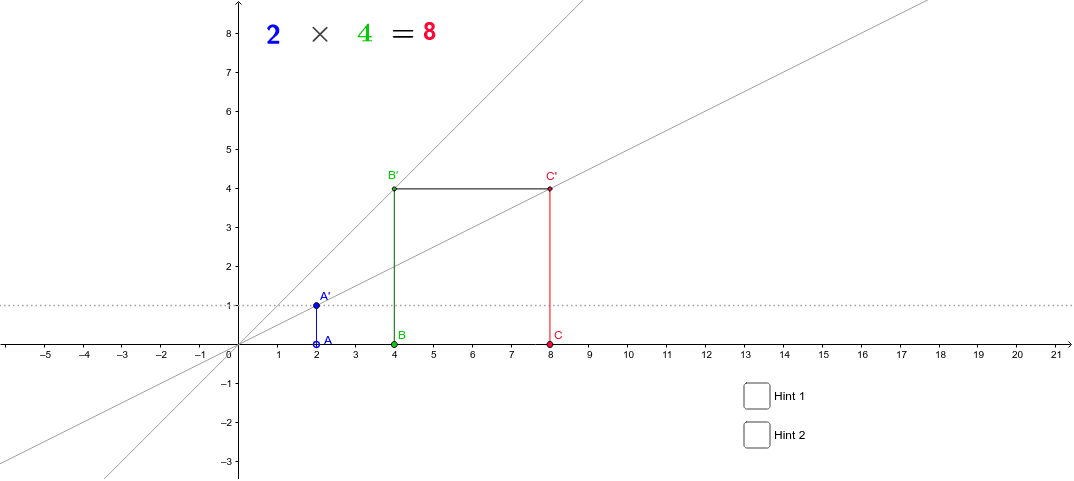
This similar triangle machine demonstrates the proportional relationship between the sides of similar triangles. It uses the construction of similar triangles to illustrate the properties of similar triangles. Commands used include orthogonal line, intersection, segment, line, and polygon. Suitable for middle and high school students learning about similar triangles.
GeoGebra Commands & Parameters
OrthogonalLine(A, a_1) → b_1Intersect(a_1, b_1) → A'Segment(A', A) → a'OrthogonalLine(B, xAxis) → dIntersect(d, c) → B'Segment(B', B) → bLine(A', O) → eOrthogonalLine(B', yAxis) → fIntersect(e, f) → C'Segment(B', C') → gOrthogonalLine(C', g) → hIntersect(h, xAxis) → CSegment(C', C) → iPolygon(A', O, A) → poly1, a_2, a, oPolygon(O, C', C) → poly2, c_1, o_1, c'
AI Drawing Prompt Reference
On a coordinate plane, draw a slanted line through the origin as a common hypotenuse. Pick a point on this line and drop a perpendicular to the x-axis, marking the foot on the axis. Connect this foot to the point to form a vertical side. From another point on the x-axis, draw a perpendicular to the y-axis, intersecting the slanted line at a second vertex. Connect this second vertex to the first foot to form a horizontal side. Then, through the second vertex, draw a perpendicular to this horizontal side, meeting the x-axis at a third point. Connect this third point back to the second vertex)Skip. This creates two right triangles sharing the same slanted line, with corresponding sides perpendicular, illustrating proportional similarity.
The prompt above was compiled from the original drawing commands and is for reference only.