
Scalene, Isosceles and Equilateral Triangles GeoGebra Example
Loading the math board and drawing, please wait…
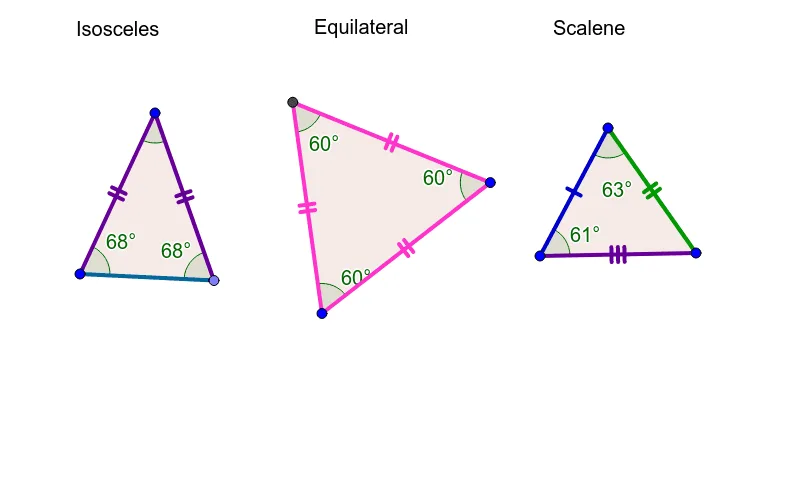
This example demonstrates the construction and properties of scalene, isosceles, and equilateral triangles using GeoGebra. Key mathematical concepts include triangle classification, geometric construction methods, vector and angle relationships. The construction involves commands like Circle, Point, Polygon, and Angle, along with parameterized polygon and angle creation. Suitable for middle or high school mathematics teaching for geometric drawing practice and concept understanding.
GeoGebra Commands & Parameters
Circle(A, B) → cPoint(c) → CPolygon(A, C, B) → poly1, b, a, c_1Angle(B, A, C) → αAngle(A, C, B) → βAngle(C, B, A) → γPolygon(D, E, 3) → poly2, d, e, f, FPolygon(G, H, I) → poly3, i, g, hAngle(H, G, I) → δAngle(G, I, H) → εAngle(I, H, G) → ζAngle(E, D, F) → ηAngle(D, F, E) → θAngle(F, E, D) → ι
AI Drawing Prompt Reference
Draw an scalene triangle, isosceles triangle, and equilateral triangle. Start by drawing a circle with diameter AB, then pick a point C on the circle and connect A, B, and C to form a scalene triangle. Next, construct an isosceles triangle with base AB and the vertex on the circle. Finally, create an equilateral triangle with all sides equal.
The prompt above was compiled from the original drawing commands and is for reference only.