
Rotating Squares Tiling
Loading the math board and drawing, please wait…
In collections
Symmetry, Transformation and Tessellation
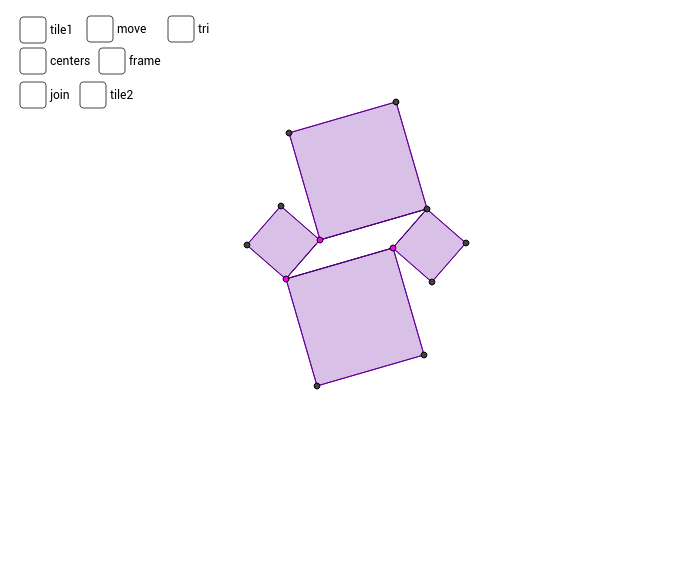
This example demonstrates the dynamic tilings generated by rotating squares, integrating core mathematical concepts like square construction, rotational transformations, sine function applications, and coordinate geometry relationships. Key GeoGebra commands and objects used in the construction include Segment, Line, Intersect, Polygon, Midpoint, Vector, Sequence, Rotate, and OrthogonalLine. It is suitable for high school students to understand geometric transformations, the connection between function graphs and actual shapes, and provides a foundation for introductory mathematical modeling.
GeoGebra Commands & Parameters
Segment(A, B) → a_2Segment(A, C) → b_2Line(B, b_2) → c_2Line(C, a_2) → d_2Intersect(c_2, d_2) → DSegment(C, D) → e_2Segment(B, D) → fPolygon(A, C, 4) → poly1, g, h, i, j, E, FPolygon(C, D, 4) → poly2, k, l, m, n, G, HPolygon(D, B, 4) → poly3, p, q, r, s, I, JPolygon(B, A, 4) → poly4, t, a_1, b_1, c_1, K, LMidpoint(F, C) → MMidpoint(G, C) → NMidpoint(J, B) → OMidpoint(K, B) → PVector(E, L) → uVector(K, J) → vSequence(Sequence[Translate[tile1, Vector[(n * u) + (m * v)]], n, -3, 3], m, -3, 3) → list1Polygon(P, O, 4) → poly5, d_1, e_1, f_1, g_1, Q, RRotate(poly5, 90*°, O) → poly5'Rotate(poly5, 180*°, O) → poly5'_1Rotate(poly5, 270*°, O) → poly5'_2OrthogonalLine(M, b_2) → h_1OrthogonalLine(P, a_2) → i_1Intersect(i_1, h_1) → SSegment(M, S) → aSegment(P, S) → bOrthogonalLine(N, e_2) → l_1OrthogonalLine(O, f) → m_1Intersect(l_1, m_1) → TSegment(N, T) → cSegment(O, T) → dSegment(S, T) → eRotate(set1, 90*°, O) → set2Rotate(set1, 180*°, O) → set3Rotate(set1, 270*°, O) → set4Sequence(Sequence[Translate[tile2, Vector[(n * u) + (m * v)]], n, -3, 3], m, -3, 3) → list2Polygon(E, A, L) → poly6, l_2, e_3, a_3Polygon(B, K, J) → poly7, j_2, b_3, k_2