
Rigid Motions Example
Loading the math board and drawing, please wait…
In collections
Sequence of Rigid Motions
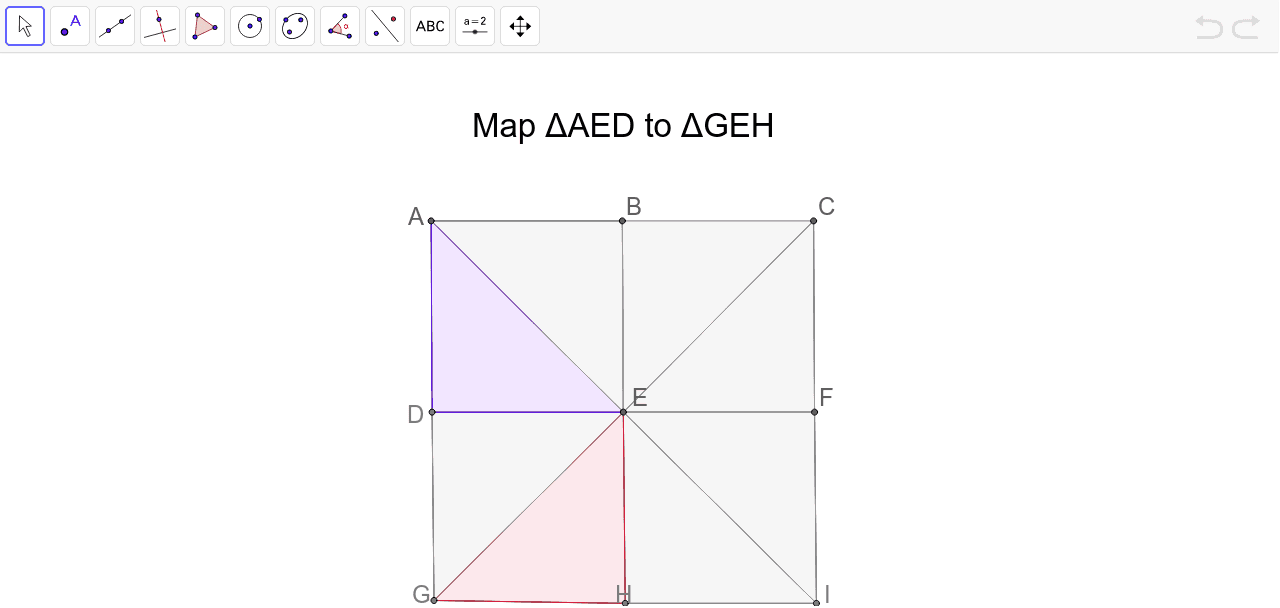
This example demonstrates the effects of rigid motions (translation, rotation) on geometric figures. Core concepts include geometric transformations, coordinate geometry, and vectors. Construction involves commands like Point, Segment, Polygon and objects A, B, a, C, b, etc. Suitable for high school mathematics education to understand the properties of spatial geometric transformations.
GeoGebra Commands & Parameters
Point(Circle[A, 4]) → BSegment(A, B) → aPoint(Circle[B, 4]) → CSegment(B, C) → bPoint(Circle[D, 4]) → ESegment(D, E) → cPoint(Circle[E, 4]) → FSegment(E, F) → dPoint(Circle[G, 4]) → HSegment(G, H) → ePoint(Circle[H, 4]) → ISegment(H, I) → fSegment(A, D) → gSegment(D, G) → hSegment(B, E) → iSegment(E, H) → jSegment(C, F) → kSegment(F, I) → lSegment(A, E) → mSegment(E, C) → nSegment(G, E) → pSegment(E, I) → qPolygon(E, B, C) → poly2, c_1, e_2, b_2Polygon(E, F, C) → poly3, c_2, e_3, f_1Polygon(E, I, F) → poly4, f_2, e_4, i_1Polygon(E, H, I) → poly5, i_2, e_5, h_1Polygon(E, G, H) → poly6, h_2, e_6, g_1Polygon(E, D, G) → poly7, g_2, e_7, d_1Polygon(E, D, A) → poly8, a_2, e_8, d_2Polygon(E, A, B) → poly1, b_1, e_1, a_1
AI Drawing Prompt Reference
Draw a geometric figure using points A, B, C, D, E, F, G, H, I, where points are translated and rotated to form a series of parallelograms. Start by creating a circle with center A and radius 4 to get point B, then draw segment AB, and continue this process to create multiple segments and polygons, ultimately forming a complex geometric pattern.
The prompt above was compiled from the original drawing commands and is for reference only.