
Rigid Motions: Example 1
Loading the math board and drawing, please wait…
In collections
Sequence of Rigid Motions
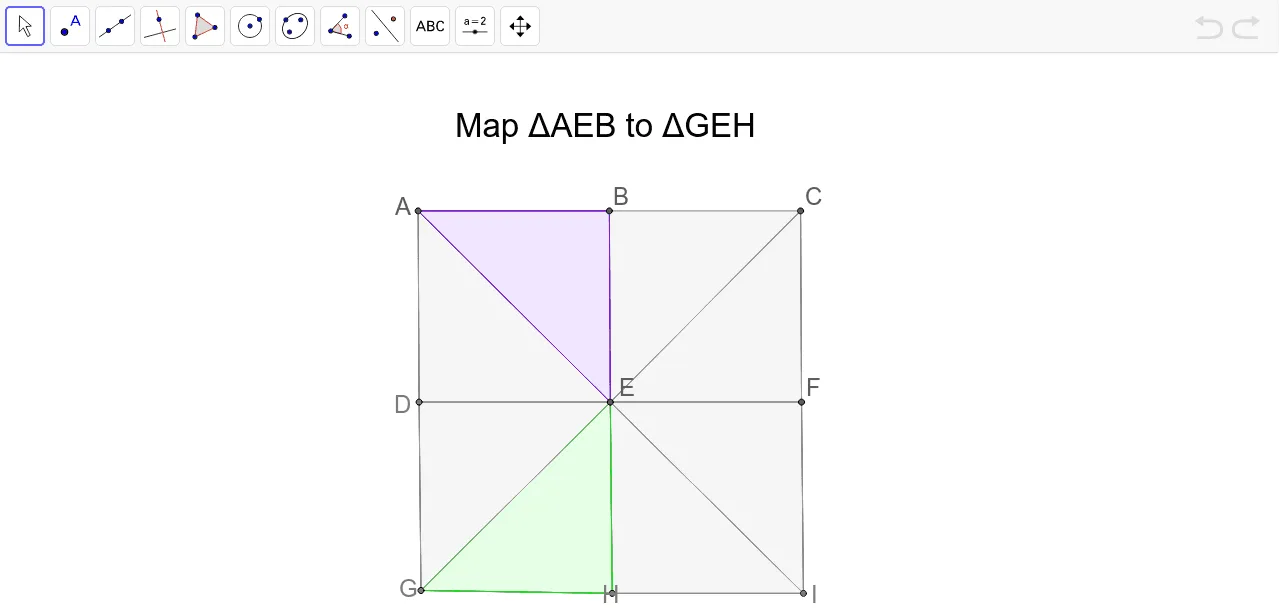
This example demonstrates the effects of rigid motions (translation, rotation) on the shape and position of geometric figures. Core mathematical concepts include geometric transformations, vectors, and coordinate geometry. Construction involves commands like Point, Segment, Polygon, and objects A, B, a, C, b, D, E, c, F, d, G, H, e, I, f, g, h, i, j, k, l, m, n, p, q, poly2, c_1, e_2, b_2, poly3, c_2, e_3, f_1, poly4, f_2, e_4, i_1, poly5, i_2, e_5 to achieve transformations. Suitable for high school and above students to explore properties of geometric transformations.
GeoGebra Commands & Parameters
Point(Circle[A, 4]) → BSegment(A, B) → aPoint(Circle[B, 4]) → CSegment(B, C) → bPoint(Circle[D, 4]) → ESegment(D, E) → cPoint(Circle[E, 4]) → FSegment(E, F) → dPoint(Circle[G, 4]) → HSegment(G, H) → ePoint(Circle[H, 4]) → ISegment(H, I) → fSegment(A, D) → gSegment(D, G) → hSegment(B, E) → iSegment(E, H) → jSegment(C, F) → kSegment(F, I) → lSegment(A, E) → mSegment(E, C) → nSegment(G, E) → pSegment(E, I) → qPolygon(E, B, C) → poly2, c_1, e_2, b_2Polygon(E, F, C) → poly3, c_2, e_3, f_1Polygon(E, I, F) → poly4, f_2, e_4, i_1Polygon(E, H, I) → poly5, i_2, e_5, h_1Polygon(E, G, H) → poly6, h_2, e_6, g_1Polygon(E, D, G) → poly7, g_2, e_7, d_1Polygon(E, D, A) → poly8, a_2, e_8, d_2Polygon(E, A, B) → poly1, b_1, e_1, a_1
AI Drawing Prompt Reference
Draw a center point and create four equally spaced points radiating from it to form a square. Connect adjacent points to complete the square. Then, draw circles with each side of the square as the center and a radius equal to the square's side length. Find the intersection points of these circles. Connect the intersection points to form a new square and several smaller squares, demonstrating the effects of rigid motions like translation and rotation.
The prompt above was compiled from the original drawing commands and is for reference only.