
Rekenrek for LZ 2 – Ten-Bead Addition Model
Loading the math board and drawing, please wait…
In collections
Virtual Manipulatives
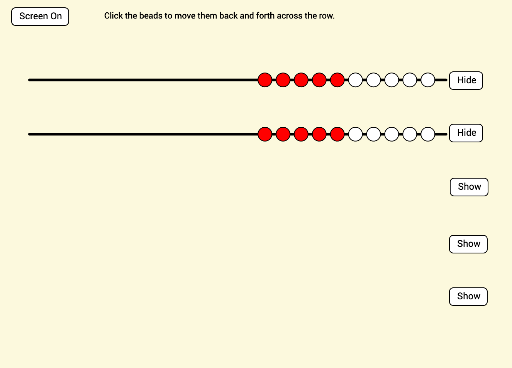
This GeoGebra example presents a Dutch-style Rekenrek (arithmetic rack) designed for lower elementary level 2 (LZ 2). It features two rows of ten sliding beads each, providing a visual and tactile model for demonstrating addition of natural numbers and one-to-one correspondence. The core mathematical concepts include natural number recognition, addition, number decomposition and composition, and basic statistical characteristics such as counting beads per row. The construction uses GeoGebra commands: Segment to draw the frame, Point to position beads, Sum to compute row totals, Polygon to shape each bead, Line for alignment, and Corner to define canvas boundaries. Key objects include 20 bead points (r1b1–r1b10, r2b1–r2b10) and list/value objects like row1list and row1value for dynamic updates. This resource is ideal for grades 1–2 mathematics instruction, special education number sense activities, or interactive whiteboard demonstrations, allowing students to drag beads and visually grasp addition and subtraction.
GeoGebra Commands & Parameters
Segment((0, 11), (23, 11)) → fPoint(f) → APoint(f) → BPoint(f) → CPoint(f) → DPoint(f) → EPoint(f) → FPoint(f) → IPoint(f) → JPoint(f) → GPoint(f) → HPoint(f) → KPoint(f) → LPoint(f) → MPoint(f) → NPoint(f) → OPoint(f) → PPoint(f) → QPoint(f) → RPoint(f) → SPoint(f) → TSum(row1list) → row1valueSegment((0, 8), (23, 8)) → gPoint(g) → UPoint(g) → VPoint(g) → WPoint(g) → ZPoint(g) → A_1Point(g) → B_1Point(g) → C_1Point(g) → D_1Point(g) → E_1Point(g) → F_1Point(g) → G_1Point(g) → H_1Point(g) → I_1Point(g) → J_1Point(g) → K_1Point(g) → L_1Point(g) → M_1Point(g) → N_1Point(g) → O_1Point(g) → P_1Sum(row2list) → row2valuePolygon(Q_1, R_1, S_1, T_1) → poly1, q_1, r_1, s_1, t_1Segment((0, 5), (23, 5)) → hPoint(h) → U_1Point(h) → V_1Point(h) → W_1Point(h) → Z_1Point(h) → B_2Point(h) → A_2Point(h) → C_2Point(h) → D_2Point(h) → E_2Point(h) → F_2Point(h) → G_2Point(h) → H_2Point(h) → I_2Point(h) → J_2Point(h) → K_2Point(h) → L_2Point(h) → M_2Point(h) → N_2Point(h) → O_2Point(h) → P_2Segment((0, 2), (23, 2)) → iPoint(i) → Q_2Point(i) → R_2Point(i) → S_2Point(i) → T_2Point(i) → U_2Point(i) → V_2Point(i) → W_2Point(i) → Z_2Point(i) → A_3Point(i) → B_3Point(i) → C_3Point(i) → D_3Point(i) → E_3Point(i) → F_3Point(i) → G_3Point(i) → H_3Point(i) → I_3Point(i) → J_3Point(i) → K_3Point(i) → L_3Sum(row3list) → row3valueSum(row4list) → row4valueLine(M_3, y = 0) → jPoint(j) → N_3Line(M_3, x = 0) → kPoint(k) → O_3Polygon(M_3, O_3, P_3, N_3) → poly2, m_3, o_3, p_3, n_3Corner(5) → CanvasSizeSum(row5list) → row5valueSegment((0, -1), (23, -1)) → lPoint(l) → Q_3Point(l) → R_3Point(l) → S_3Point(l) → T_3Point(l) → U_3Point(l) → V_3Point(l) → W_3Point(l) → Z_3Point(l) → A_4Point(l) → B_4Point(l) → C_4Point(l) → D_4Point(l) → E_4Point(l) → F_4Point(l) → G_4Point(l) → H_4Point(l) → I_4Point(l) → J_4Point(l) → K_4Point(l) → L_4
AI Drawing Prompt Reference
Draw a Dutch-style arithmetic rack with two horizontal rods, each holding ten sliding beads. Start with the top rod, place ten beads evenly along it, and compute the total count for that row. Then draw the bottom rod, place ten beads similarly, and compute its total. Represent beads as polygons and rods as line segments, all within a canvas. The design supports addition and counting for early math, with beads draggable to adjust quantities.
The prompt above was compiled from the original drawing commands and is for reference only.