
Rectangle Perimeter Calculation
Loading the math board and drawing, please wait…
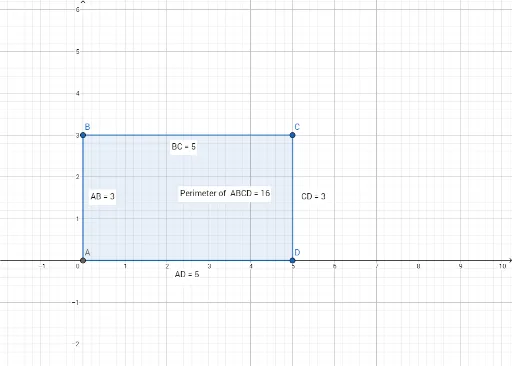
This example demonstrates how to dynamically calculate and visualize the perimeter of a rectangle using GeoGebra. Key math concepts include perimeter calculation, polygon construction, distance measurement, midpoint determination, etc. GeoGebra commands used in the construction are: Intersect, Polygon, Distance, Midpoint, Perimeter, and PointIn. Suitable for middle school and above students to understand perimeter calculation and geometric construction methods.
GeoGebra Commands & Parameters
Intersect(xAxis, yAxis) → APolygon(A, B, C, D) → q1, a, b, c, dDistance(A, B) → distanceABDistance(B, C) → distanceBCDistance(C, D) → distanceCDDistance(A, D) → distanceADMidpoint(A, D) →Perimeter(q1) → perimeterq1PointIn(q1) → Pointq1
AI Drawing Prompt Reference
Draw a rectangle with one vertex at the origin where the x-axis and y-axis intersect. Place the other three vertices on the axes: one on the positive x-axis, one on the positive y-axis, and one at the point where the perpendiculars from those two meet, forming a right-angled rectangle. Connect the four vertices in order to form the rectangle. Measure and label the lengths of all four sides, then compute and display the perimeter. Mark the midpoint of one side (the side along the y-axis) with a point. Finally, place a random point inside the rectangle to show it lies within the shape. The diagram should clearly show the axes, the rectangle, side lengths, perimeter value, midpoint, and interior point.
The prompt above was compiled from the original drawing commands and is for reference only.