
Quadrilateral to Rectangle Dissection
Loading the math board and drawing, please wait…
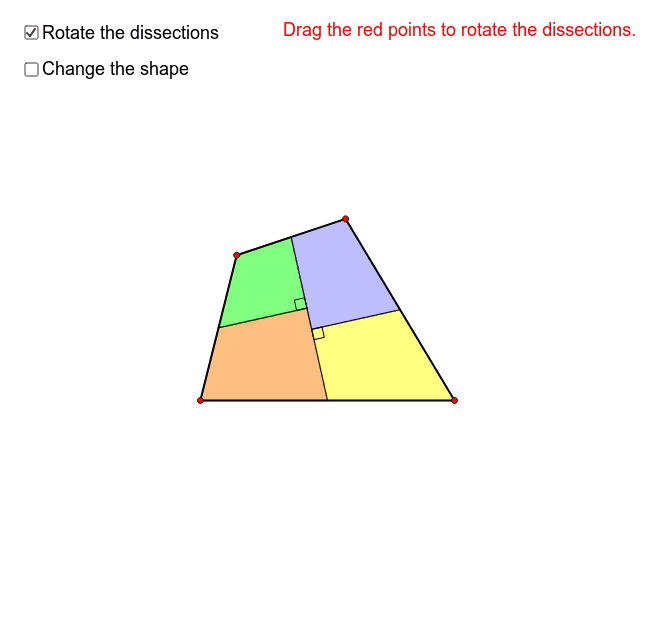
This example demonstrates how a quadrilateral can be dissected into a rectangle by drawing a line joining the mid-points of one pair of opposite sides. It involves core mathematical concepts like midpoints, segments, rotation, and intersection. The construction uses commands such as Polygon, Midpoint, Segment, Intersect, Point, Rotate, and Angle in GeoGebra. Suitable for high school students learning geometric constructions.
GeoGebra Commands & Parameters
Polygon(A, B, C, D) → poly1, a, b, c, dMidpoint(d) → FMidpoint(c) → GMidpoint(b) → HSegment(F, H) → eIntersect(OrthogonalLine[G, e], e) → JPoint(h) → LRotate(F, Angle[A, F, L], F) → F'Rotate(A, Angle[A, F, L], F) → A'Rotate(B, Angle[A, F, L], F) → B'Rotate(H, Angle[A, F, L], F) → H'_1Polygon(F', A', B', H'_1) → poly3, f', a', b', h'_1Midpoint(a') → EIntersect(OrthogonalLine[E, h'_1], h'_1) → IPoint(f) → MRotate(E, Angle[B', E, M], E) → E'Rotate(I, Angle[B', E, M], E) → I'Rotate(H'_1, Angle[B', E, M], E) → NRotate(B', Angle[B', E, M], E) → B''Polygon(E', I', N, B'') → poly4, e', i', n, b''Polygon(L, E', I, F') → poly5, l, e'_1, i, f'_1Point(g) → KRotate(F, Angle[D, F, K], F) → F'_1Rotate(H, Angle[D, F, K], F) → H'Rotate(C, Angle[D, F, K], F) → C'Rotate(D, Angle[D, F, K], F) → D'Polygon(F'_1, H', C', D') → poly2, f'_2, h', c', d'Rotate(J, Angle[D, F, K], F) → J'Rotate(G, Angle[D, F, K], F) → G'Point(p) → ORotate(G', Angle[C', G', O], G') → G''Rotate(J', Angle[C', G', O], G') → J''Rotate(H', Angle[C', G', O], G') → H''Rotate(C', Angle[C', G', O], G') → C''Polygon(G'', J'', H'', C'') → poly6, g'', j'', h'', c''Polygon(K, F'_1, J', G') → poly7, k_1, f'_3, j', g'Segment(F, H) → mSegment(G, J) → qSegment(Midpoint[Segment[A, B]], Intersect[m, OrthogonalLine[Midpoint[Segment[A, B]], m]]) → rAngle(F, Intersect[m, OrthogonalLine[Midpoint[Segment[A, B]], m]], Midpoint[Segment[A, B]]) → αAngle(H, J, G) → β