
P4 Area Exercise 7: Parallelogram Area and Transformations
Loading the math board and drawing, please wait…
In collections
Interactive Geometry: Area
P4 Area Exercise 7: Parallelogram Area and Transformations
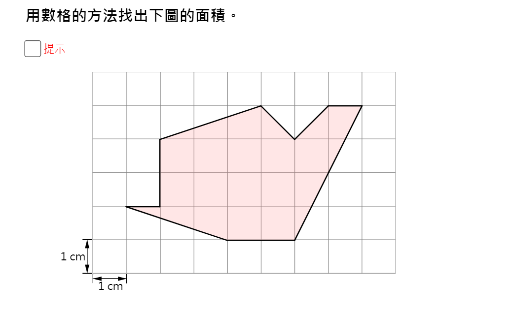
This interactive GeoGebra applet demonstrates the calculation of parallelogram area and explores geometric transformations in the coordinate plane. Using GeoGebra's construction tools, the applet builds polygons, line segments, and vectors to form a parallelogram, then applies rotation and translation commands to investigate how figures move on the plane and how these transformations affect the area of the resulting shapes.
Students can manipulate the vertices and parameters of the parallelogram through sliders and interactive controls, observing in real time how the shape changes as rotations and translations are applied. The applet highlights the key principle that rigid transformations such as rotation and translation preserve area, reinforcing an important concept in plane geometry. By dragging points and adjusting parameters, learners develop an intuitive understanding of how geometric properties remain invariant under certain transformations while other attributes change.
In addition to exploring transformational geometry, the applet incorporates maximum and minimum value functions to investigate optimization problems related to the parallelogram's area. Students can examine how varying specific dimensions or angles leads to the largest or smallest possible area within given constraints, connecting geometric reasoning with algebraic optimization techniques. This feature provides a rich environment for exploring extremum problems and developing problem-solving skills.
The applet is designed for interactive teaching and practice in plane geometry, area computation, and geometric transformations. It is particularly suitable for students studying Grade 4 level mathematics, offering hands-on exploration that complements traditional instruction. The visual and dynamic nature of the tool allows learners to test hypotheses, observe patterns, and verify mathematical relationships independently, fostering deeper conceptual understanding.
Teachers can use this applet as a classroom demonstration tool or assign it as an exploratory exercise for independent student practice. It supports both guided discovery and open-ended investigation, making it a versatile resource for diverse learning environments.
GeoGebra Commands & Parameters
Segment(X0, X0 + (0, mark)) → hSegment(X0 + (1, 0), X0 + (1, mark)) → iVector(X0 + (0, mark / 2), X0 + (1, mark / 2)) → uVector(X0 + (1, mark / 2), X0 + (0, mark / 2)) → vSegment(Y0 - (mark, 0), Y0) → jSegment(Y0 - (mark, 1), Y0 - (0, 1)) → kVector(Y0 - (mark / 2, 1), Y0 - (mark / 2, 0)) → wVector(Y0 - (mark / 2, 0), Y0 - (mark / 2, 1)) → zPoint(yAxis) → APoint(xAxis) → BPoint(xAxis) → CRotate(E, (90° * t1), F) → E'Rotate(F, (90° * t1), F) → F'Rotate(L, (90° * t1), F) → L'Polygon(E', F', L') → poly1, l', e', f'Rotate(G, (-90° * t2), F) → G'Rotate(M, (-90° * t2), F) → M'Rotate(F, (-90° * t2), F) → F'_1Polygon(G', M', F'_1) → poly2, f'_1, g', m'Rotate(D, (-180° * t3), J) → D'Rotate(E, (-180° * t3), J) → E'_1Rotate(J, (-180° * t3), J) → J'Polygon(D', E'_1, J') → poly3, j', d', e'_1Rotate(J, (180° * t4), J) → J'_1Rotate(K, (180° * t4), J) → K'Rotate(C, (180° * t4), J) → C'Polygon(J'_1, K', C') → poly4, c', j'_1, k'Max(t5 - 1, 0) → s2Min(t5, 1) → s1Min(t6, 1) → w1Max(t6 - 1, 0) → w2Translate(Translate[G, Vector[(s1 * Vector[M, H])]], Vector[(s2 * Vector[M, B])]) → G''Translate(Translate[M, Vector[(s1 * Vector[M, H])]], Vector[(s2 * Vector[M, B])]) → M''Translate(Translate[H, Vector[(s1 * Vector[H, M])]], Vector[(s2 * Vector[M, B])]) → H''Polygon(G'', H'', M'') → poly5, m'', g'', h''Translate(Translate[B, Vector[(w1 * Vector[N, A])]], Vector[(w2 * Vector[B, M])]) → B'Translate(Translate[N, Vector[(w1 * Vector[N, A])]], Vector[(w2 * Vector[B, M])]) → N'Translate(Translate[A, Vector[(w1 * Vector[A, N])]], Vector[(w2 * Vector[B, M])]) → A'Polygon(A', B', N') → poly6, n', a', b'Polygon(E', F', L') → poly1', l'_1, e'_2, f'_2Polygon(G', M', F'_1) → poly2', f'_3, g'_1, m'_1Polygon(D', E'_1, J') → poly3', j'_2, d'_1, e'_3Polygon(J'_1, K', C') → poly4', c'_1, j'_3, k'_1Polygon(G'', H'', M'') → poly5', m''_1, g''_1, h''_1Polygon(A', B', N') → poly6', n'_1, a'_1, b'_1Polygon(H, I, N, B, C, K, J, L) → poly7, h_1, i_1, n, b, c, k_1, j_1, lPolygon(A, B, C, D, E, F, G, H, I) → poly8, a, b_1, c_1, d, e, f, g, h_2, i_2Polygon(E, F, L) → poly9, l_1, e_1, f_1Polygon(F, G, M) → poly10, m, f_2, g_1Polygon(G, H, M) → poly11, m_1, g_2, h_3Polygon(A, B, N) → poly12, n_1, a_1, b_2Polygon(C, K, J) → poly13, j_2, c_2, k_2Polygon(D, E, J) → poly14, j_3, d_1, e_2
AI Drawing Prompt Reference
Draw a composite figure on a coordinate plane. Start by constructing two parallelograms using pairs of parallel segments and vectors, placed at different locations. Then, rotate three triangles around a fixed point by various angles (clockwise and counterclockwise) to create four rotated triangles. Next, translate two triangles along specified directions to form two translated triangles. Finally, connect all key points with segments to form a large octagon and an inner polygon, ensuring all shapes are interconnected to illustrate area and transformations.
The prompt above was compiled from the original drawing commands and is for reference only.