
Net for a Rectangular Prism
Loading the math board and drawing, please wait…
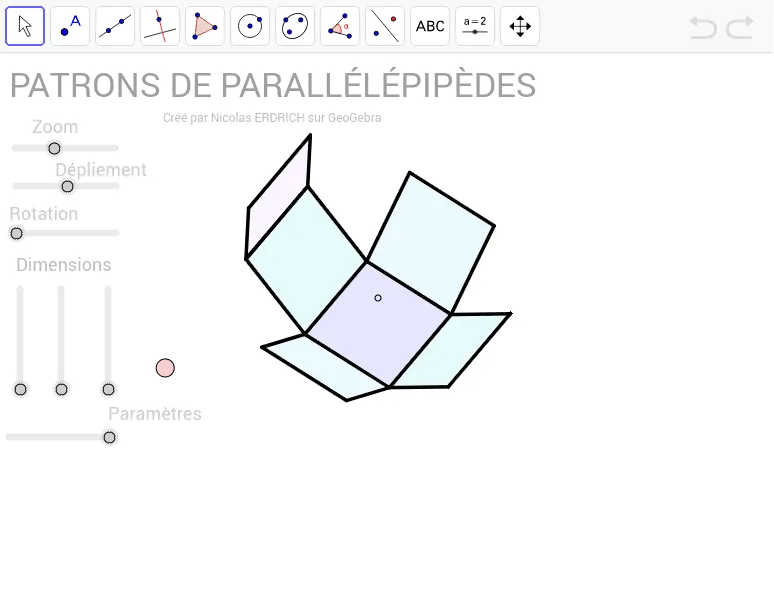
This example demonstrates the construction of a net for a rectangular prism using GeoGebra. It involves core mathematical concepts such as solid geometry, polygon construction, vector operations, and trigonometric applications. Key GeoGebra commands and objects used include Sequence, Element, Polygon, Segment, and various parameters like z, R_z, a, echelle, P, β, sinβ, cosβ, R_y, α, sinα, cosα, R_x, I, u, v, w, Mat, cube, cube', alpha, texte1, texte2, AE, droite, listepoints, A, E, C_1, D, poly1, a_1, b, c_1, d, B, F, G, H, poly2. This is suitable for high school geometry teaching or as a practice in geometric constructions to understand 3D shapes' 2D unfoldings.
GeoGebra Commands & Parameters
Sequence(Mat * Element[cube, k], k, 1, 8) → cube'Element(Element[AE, 3], 1) → droiteSequence(I + (Element[cube', k, 1, 1], Element[cube', k, 2, 1]), k, 1, 8) → listepointsElement(listepoints, 2) → AElement(listepoints, 1) → EElement(listepoints, 4) → C_1Element(listepoints, 3) → DPolygon(A, E, C_1, D) → poly1, a_1, b, c_1, dElement(listepoints, 6) → BElement(listepoints, 7) → FElement(listepoints, 8) → GElement(listepoints, 5) → HPolygon(B, F, G, H) → poly2, e, f, g, hElement(listepoints, 3) → CPolygon(F, C, A, B) → poly3, f_1, i, a_2, b_1Element(AB, 3, 1) → avantPolygon(C_1, G, H, E) → poly4, c_2, g_1, h_1, e_1Element(AC, 3, 1) → dessusPolygon(F, C, C_1, G) → poly5, f_2, c_3, c_4, g_2Polygon(A, B, H, E) → poly6, a_3, b_2, h_2, e_2Segment(E, A) → cSegment(A, C) → jSegment(A, B) → kSegment(C, C_1) → lSegment(C_1, E) → mSegment(A, B) → pSegment(B, H) → qSegment(H, E) → rSegment(H, G) → sSegment(B, F) → tSegment(G, C_1) → d_1Segment(F, G) → i_1Segment(F, C) → j_1Polygon(A, B, F', D') → poly7, a_4, b_3, f', d'Polygon(E, A, D'', C') → poly8, e_3, a_5, d'', c'Polygon(B, F'', G', H) → poly9, b_4, f'', g', h_3Polygon(H, G'', C''', E) → poly10, h_4, g'', c''', e_4Polygon(A_2, B_2, G'', C''') → poly11, a_6, b_5, g''_1, c'''_1
AI Drawing Prompt Reference
Draw a net for a rectangular prism, consisting of six rectangular faces connected by fold lines. Start by defining eight vertices, with four forming the base rectangle and four forming the top rectangle, linked by side edges. When unfolded, the base and top are placed centrally, with four side faces arranged around them in a cross-like or similar layout. Each face is a rectangle with side lengths corresponding to the prism's length, width, and height. The diagram should clearly show the relative positions and connections of all faces, illustrating how the 3D shape unfolds into a 2D plane.
The prompt above was compiled from the original drawing commands and is for reference only.