
Locating Triangle Centers
Loading the math board and drawing, please wait…
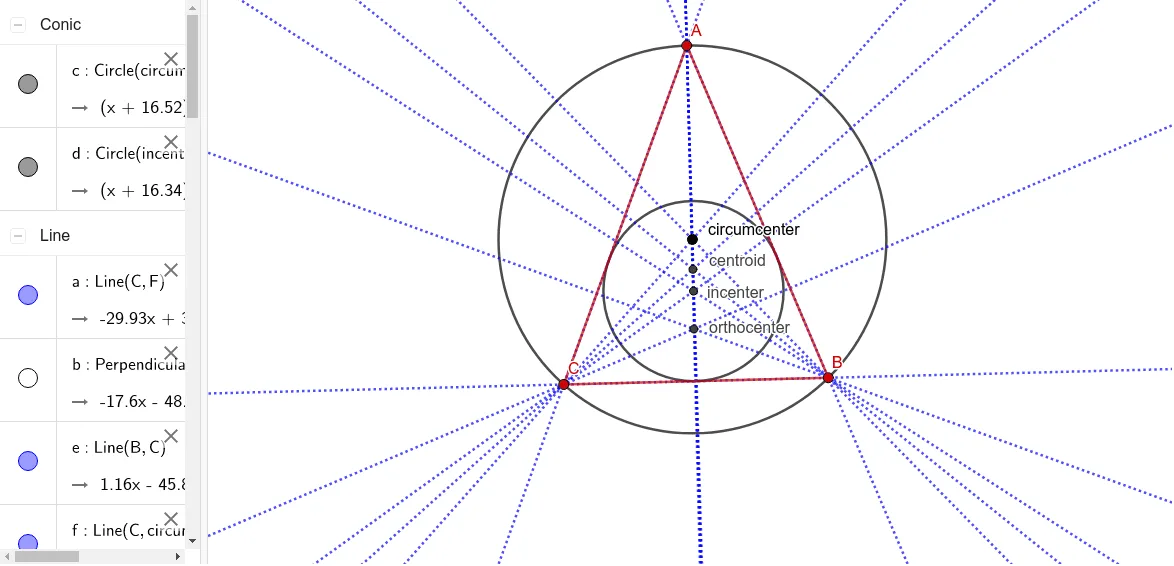
This example demonstrates how to locate all four types of triangle centers: circumcenter, orthocenter, incenter, and centroid. It involves core mathematical concepts such as triangle centers, geometric construction, and relationships between segments and angles. The construction uses GeoGebra commands like Circle, Point, Line, Segment, OrthogonalLine, AngularBisector, Intersect, and Midpoint. Suitable for high school mathematics education or for geometry enthusiasts studying triangle properties.
GeoGebra Commands & Parameters
Circle(circumcenter, B) → cPoint(c) → APoint(c) → CLine(C, circumcenter) → fLine(B, circumcenter) → gLine(A, circumcenter) → hSegment(A, B) → iSegment(B, C) → jSegment(C, A) → kOrthogonalLine(B, k) → lOrthogonalLine(A, j) → mOrthogonalLine(C, i) → nAngularBisector(C, A, B) → pAngularBisector(A, B, C) → qAngularBisector(B, C, A) → rIntersect(l, m) → orthocenterIntersect(p, q) → incenterMidpoint(A, C) → DMidpoint(C, B) → EMidpoint(B, A) → FLine(B, D) → sLine(A, E) → tLine(C, F) → aIntersect(s, t) → centroidOrthogonalLine(incenter, k) → bIntersect(b, k) → GCircle(incenter, G) → dLine(B, C) → eLine(C, A) → f_1Line(A, B) → g_1
AI Drawing Prompt Reference
Draw a triangle and locate its circumcenter, orthocenter, incenter, and centroid. Start by drawing the triangle's three sides. Then construct the perpendicular bisectors of each side to find the circumcenter. Next, draw the altitudes from each vertex to locate the orthocenter. After that, construct the angle bisectors of each angle to find the incenter. Finally, connect the midpoints of each side to determine the centroid. Highlight each center with a distinct color or marker to show their relationships with the triangle.
The prompt above was compiled from the original drawing commands and is for reference only.