
Isosceles Trapezoid Construction with Sides and Midsegments
Loading the math board and drawing, please wait…
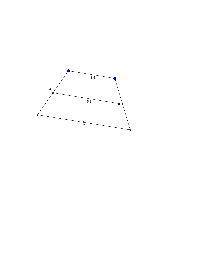
This example demonstrates how to construct an isosceles trapezoid with GeoGebra, highlighting its bases, equal legs, and the midsegments connecting the midpoints of the legs. The core mathematical concepts include the properties of an isosceles trapezoid (parallel bases, equal non‑parallel sides) and the midsegment theorem (the segment joining the midpoints of the legs equals half the sum of the bases). The construction uses GeoGebra commands such as Segment, Circle, Intersect, Line, and Midpoint, and defines points A, B, C, D, etc., to locate vertices and midpoints. It is suitable for high‑school geometry classes and introductory mathematical modeling courses, helping students connect geometric constructions with algebraic reasoning.
GeoGebra Commands & Parameters
Segment(A, B) → fCircle(A, 4) → cCircle(B, 4) → dIntersect(c, d) → C, D, ,Line(D, f) → gIntersect(c, g) → E, FIntersect(d, g) → G, HSegment(A, F) → hSegment(B, H) → iSegment(F, H) → jMidpoint(h) → IMidpoint(i) → JSegment(I, J) → k