
Interactive Proof of Thales' Theorem
Loading the math board and drawing, please wait…
In collections
Thales' Theorem
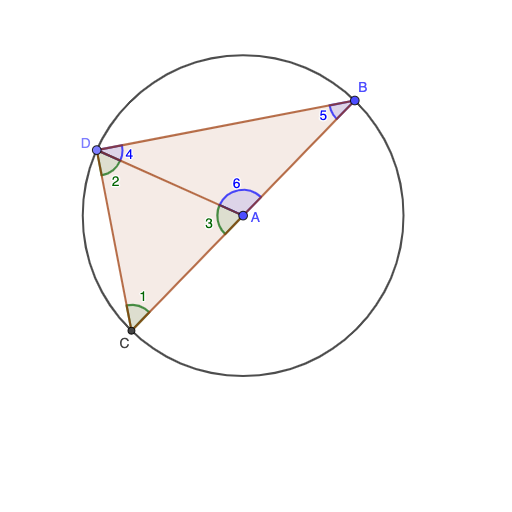
This GeoGebra example demonstrates Thales' Theorem: the angle subtended by a diameter of a circle is always a right angle (90°). Users can drag point C along the circle to observe that ∠ACB remains a right angle dynamically. Key mathematical concepts include the circle angle theorem, right triangle properties, and circle geometry. Construction details: Circle command creates circle o, Line command draws diameter AB, Point command places movable point C, Polygon command forms triangle ABC, Intersect command finds intersection points, InteriorAngles and Angle commands measure and display angles. This interactive construction is ideal for middle school geometry teaching, theorem exploration, classroom demonstration, and student investigation.
GeoGebra Commands & Parameters
SelectedIndex(question4) → response4Circle(A, B) → oLine(B, A) → lIntersect(o, l, 2) → CPoint(o) → DPolygon(C, A, D) → t1, e, b, aInteriorAngles(t1) → angle1, angle3, angle2Polygon(A, B, D) → t2, d, c, b_1InteriorAngles(t2) → angle6, angle5, angle4Textfield(response7) → question7_1Textfield(response3) → question3SelectedIndex(question5) → response5SelectedIndex(question6) → response6Angle(C, D, B) → α
AI Drawing Prompt Reference
Draw a circle with diameter AB, and move point C on the circle to observe if ∠ACB remains a right angle. First, create circle o, then draw the diameter AB, place a movable point C on the circle to form triangle ABC, and finally measure and display the angle ∠ACB.
The prompt above was compiled from the original drawing commands and is for reference only.