
Interactive Polygon Area Calculation Demo
This interactive GeoGebra applet provides a comprehensive and dynamic demonstration of polygon area calculation, serving as an exceptional visual tool for exploring plane geometry. Designed for both students and educators, the application bridges the gap between abstract area formulas and concrete geometric intuition by allowing users to manipulate shapes and observe the mathematical consequences in real time.
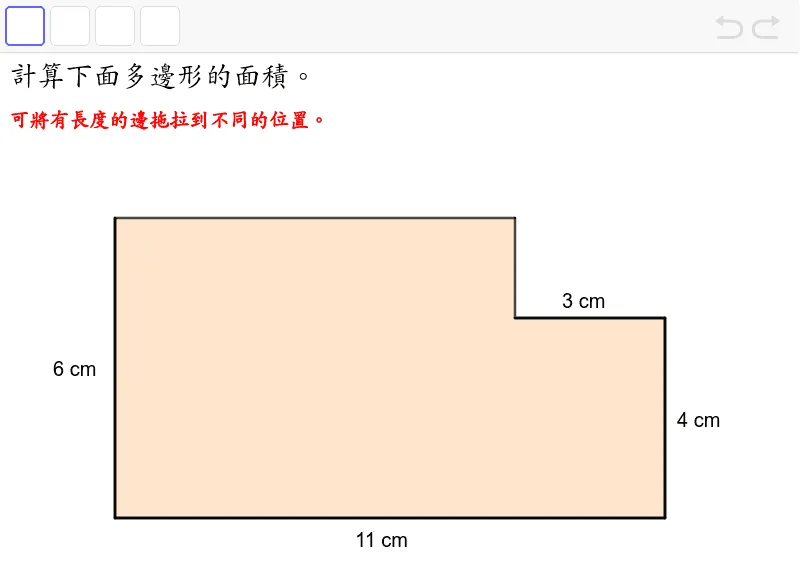
At its core, the applet illustrates the geometric approach to solving polygon area problems. It achieves this by constructing multiple polygons, explicitly labeled within the workspace as poly1 and others, complete with their defining edges and vertices. To deepen the mathematical exploration, the demonstration integrates vector and segment tools. These tools visually decompose the polygons, highlighting the underlying structural components such as base segments, height vectors, and triangular subdivisions that are fundamental to deriving and understanding area formulas.
The true power of this demonstration lies in its high level of interactivity. The workspace features several draggable interactive points, specifically designated as moved1 through moved4. By clicking and dragging these points, users can dynamically adjust the shapes of the polygons. As a vertex is repositioned, the connected edges stretch or compress, the associated vectors update their magnitude and direction, and the overall geometry shifts seamlessly. Most importantly, the calculated area of the polygon updates instantaneously, providing immediate visual and numerical feedback.
This real-time manipulation offers profound educational benefits. For students, it transforms passive learning into an active discovery process. They can experiment with geometric properties, such as observing that moving a vertex parallel to the opposite base does not change the area of a triangle, or seeing how the area of a complex polygon changes when its convexity is altered. It helps them internalize the relationship between a polygon's linear dimensions and its two-dimensional area.
For educators, the applet serves as a highly effective teaching aid for classroom demonstrations. It eliminates the tediousness of drawing and redrawing shapes on a chalkboard, allowing teachers to focus on the conceptual mechanics of plane geometry and polygon area formulas. By visually linking the movement of specific points to the algebraic recalculation of the area, the applet ensures that learners develop a robust, intuitive, and lasting understanding of geometric measurement.
In collections
Grade 4 Area 1: Teacher's Edition
Loading the math board and drawing, please wait…