
Integer Addition and Subtraction Game by Maertens J
Loading the math board and drawing, please wait…
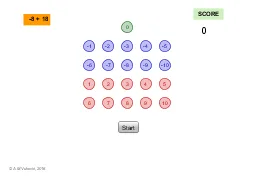
This example demonstrates a game/exercise with dropping cards for practicing the addition and subtraction of positive and negative integers. It involves core math concepts like integer operations and positive/negative number concepts. Construction uses GeoGebra commands such as Random, If, Circle, Alat1, Alat2, Line, Corner, and LaTeX. Suitable for elementary and above students for math practice and gamified learning.
GeoGebra Commands & Parameters
Random(-10, 10) → rezultatIf(Random[0, 1] ≟ 0, 0, 1) → rndOperacijaRandom(-10, 10) → rndBroj1If(rndOperacija ≟ 0, rezultat - rndBroj1, (-(rezultat - rndBroj1))) → rndBroj2If(rndOperacija ≟ 1, If[rndBroj2 ≥ 0, "" + rndBroj1 + " - " + rndBroj2 + "", "" + rndBroj1 + " - (" + rndBroj2 + ")"], "") → tekstZadMinusIf(rndOperacija ≟ 0, If[rndBroj2 ≥ 0, "" + rndBroj1 + " + " + rndBroj2 + "", "" + rndBroj1 + " + (" + rndBroj2 + ")"], "") → tekstZadPlusCircle(A, 0.3) → k1Alat1(B) → k2Alat1(C) → k3Alat1(D) → k4Alat1(E) → k5Alat1(F) → k6Alat1(G) → k7Alat1(H) → k8Alat1(I) → k9Alat1(J) → k10Circle(K, 0.3) → c1Alat2(L) → c2Alat2(M) → c3Alat2(N) → c4Alat2(O) → c5Alat2(P) → c6Alat2(Q) → c7Alat2(R) → c8Alat2(S) → c9Alat2(U) → c10If(rndOperacija ≟ 0, " " + tekstZadPlus + " ", " " + tekstZadMinus + " ") → tekstZadCircle(V, 0.3) → cLine(V, yAxis) → bCorner(5) → C_1LaTeX(C_1, true, true) → tekst5
AI Drawing Prompt Reference
Create a math game interface for practicing addition and subtraction of positive and negative integers. Randomly generate two numbers and an operation symbol, represent the numbers with circles, connect them with lines, and display the arithmetic expression. Draw the circles for the numbers first, connect them to a central line, then display the expression above.
The prompt above was compiled from the original drawing commands and is for reference only.