
Hyperbola Construction and Geometric Properties Exploration
Loading the math board and drawing, please wait…
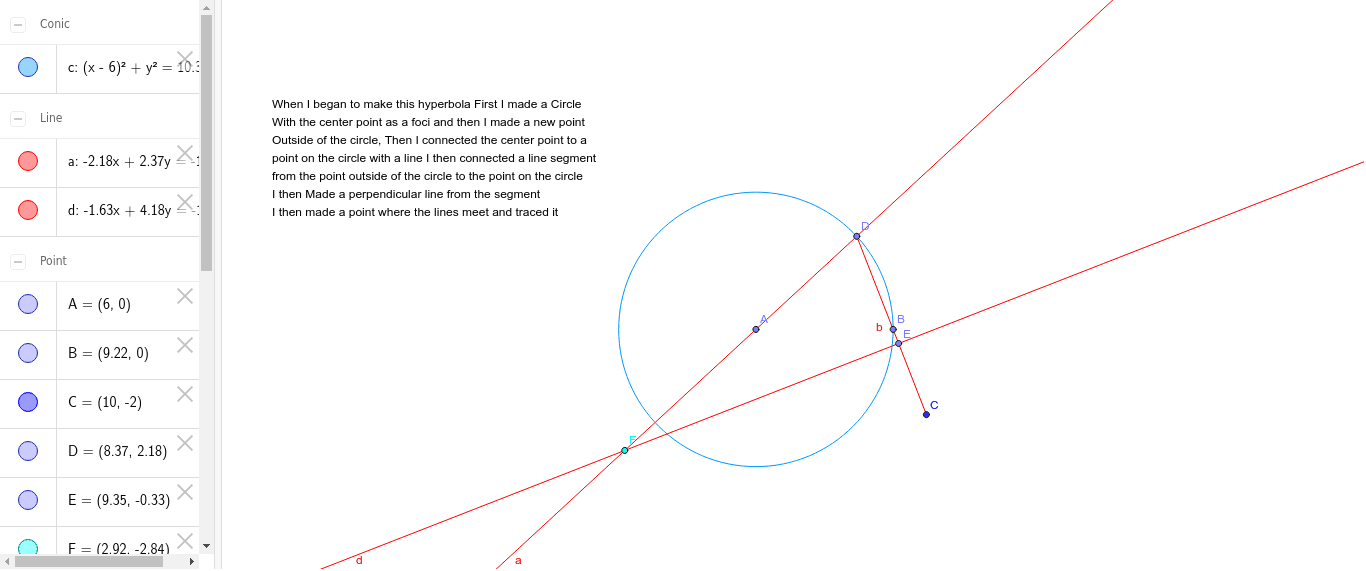
This GeoGebra example demonstrates how to construct a hyperbola and explore its geometric properties. The core mathematical concepts include the definition of hyperbola, foci, directrix, and the locus definition. Using commands such as Point, Circle, Line, Segment, OrthogonalLine, and Intersect, the construction creates foci, directrix, and auxiliary lines to intuitively show the formation of hyperbola. Ideal for secondary school mathematics courses covering conic sections and coordinate geometry, as well as for independent exploration of hyperbola properties.
GeoGebra Commands & Parameters
Point(xAxis) → APoint(xAxis) → BCircle(A, B) → cPoint(c) → DLine(A, D) → aSegment(D, C) → bPoint(b) → EOrthogonalLine(E, b) → dIntersect(a, d) → F
AI Drawing Prompt Reference
Draw a hyperbola by first taking two points A and B on the x-axis and drawing a circle c with A and B as its diameter. Then, take a point D on circle c and draw a line a through A. Reflect point D over line a to get point C, and connect D and C to form segment b. Draw a circle with b as its diameter, and take a point E on this circle. Draw a perpendicular line d to segment b through point E. The intersection of line a and line d is a vertex of the hyperbola.
The prompt above was compiled from the original drawing commands and is for reference only.