
Humberto Mosqueda - Kite
Loading the math board and drawing, please wait…
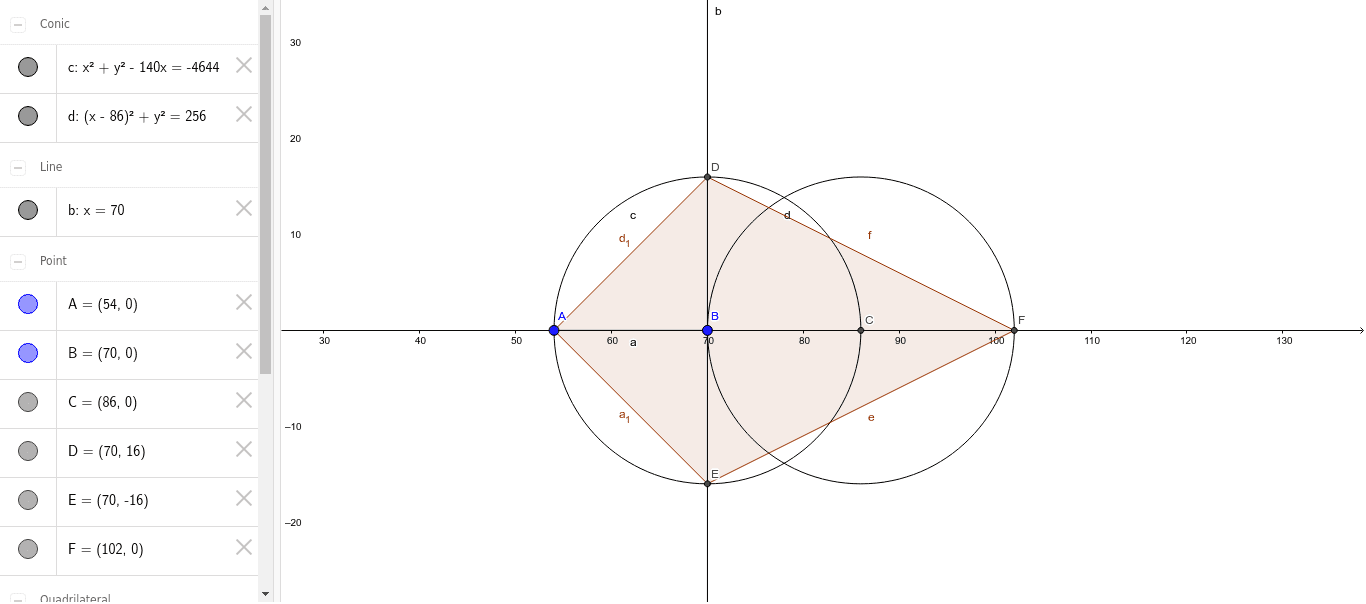
This example demonstrates the construction of a kite shape. The core mathematical concepts involved include geometric mean, coordinates, and rational numbers. Key points in the construction: Utilizes GeoGebra commands such as Segment, Circle, Intersect, OrthogonalLine, and Polygon; objects include A, B, a, c, C, d, b, D, E, F, poly1, d_1, a_1, e, f. Suitable for high school students or beginners to understand basic geometric constructions.
GeoGebra Commands & Parameters
Segment(A, B) → aCircle(B, a) → cIntersect(c, xAxis, 2) → CCircle(C, Radius[c]) → dOrthogonalLine(B, a) → bIntersect(c, b, 2) → DIntersect(c, b, 1) → EIntersect(d, xAxis, 2) → FPolygon(D, A, E, F) → poly1, d_1, a_1, e, f
AI Drawing Prompt Reference
Draw a kite-shaped figure. The figure includes points A, B, C, D, E, F. Points A and B are the two vertices of the kite. Point C is the intersection of circle c with the x-axis. Points D and E are the intersections of circle c with the perpendicular line b. Point F is the intersection of circle d with the x-axis. The figure is formed by connecting points D, A, E, and F to create the kite shape.
The prompt above was compiled from the original drawing commands and is for reference only.