
Fraction Basics by D.Vasu Raj
Loading the math board and drawing, please wait…
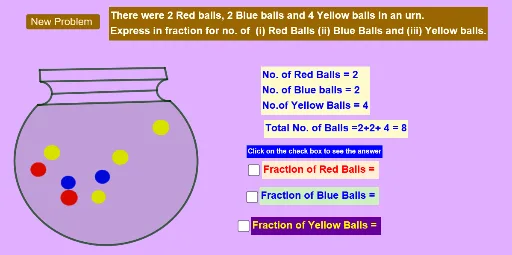
This example demonstrates the basic concepts of fractions. Using GeoGebra commands such as Point and Circle, various geometric figures related to fractions can be constructed. The core mathematical concepts include arithmetic operations with fractions. Suitable for high-grade elementary and junior high school students to learn basic fraction operations.
GeoGebra Commands & Parameters
Point(xAxis) → ACircle(A, B_2) → cCircle(C, D) → dCircle(E, F) → eCircle(G, H) → fPoint(xAxis) → JCircle(I, J) → gCircle(K, L) → hCircle(M, N) → kCircle(O, P) → pCircle(Q, R_2) → qCircle(S, T) → rCircle(U, V) → sCircle(W, Z) → t_2Circle(A_1, B_1) → c_1Point(xAxis) → D_1Circle(C_1, D_1) → d_1Circle(E_1, F_1) → e_1Circle(G_1, H_1) → f_1Circle(I_1, J_1) → g_1Circle(K_1, L_1) → h_1Circle(M_1, N_1) → k_1Circle(O_1, P_1) → p_1Circle(Q_1, R_1) → q_1Circle(S_1, T_1) → r_1Circle(U_1, V_1) → s_1Circle(W_1, Z_1) → t_1CircumcircleArc(A_2, C_2, D_2) → c_2Semicircle(D_2, E_2) → d_2Semicircle(F_2, A_2) → e_2Segment(F_2, E_2) → iSegment(A_2, D_2) → jPoint(e_2) → H_2Point(d_2) → I_2Segment(H_2, I_2) → lSegment(J_2, K_2) → mSegment(E_2, K_2) → nSegment(J_2, F_2) → bPoint(xAxis) → L_2Point(xAxis) → N_2
AI Drawing Prompt Reference
Place several points on a horizontal axis, use each as a center and another point to set the radius, drawing a series of circles that touch or intersect; then on two of these circles construct an arc and a semicircle using their endpoints, pick points on the arcs and join them with segments, creating a geometric illustration of basic fraction concepts.
The prompt above was compiled from the original drawing commands and is for reference only.