
Fraction Addition Visualized: Common Denominator with Circles and Segments
Loading the math board and drawing, please wait…
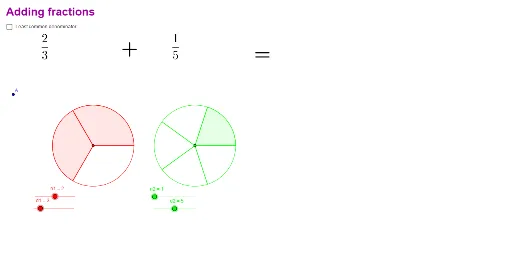
① This GeoGebra example dynamically demonstrates the complete process of adding two fractions, using circles and line segments to visually represent the splitting and merging of numerators and denominators. ② The core mathematical concepts are fraction addition and common denominators, involving least common multiple (LCM), equivalent fractions, and rational number operations. ③ Construction highlights: The Circle command draws unit circles, Sequence generates division points, LCM computes the least common denominator, and lists (list1 to list6) manage the multiples of numerators and denominators, while text objects (text1 to text8) display calculation steps and results. ④ Suitable for upper elementary to middle school students learning fraction operations, and as an interactive teaching tool for teachers to illustrate why a common denominator is needed and how LCM simplifies the calculation.
GeoGebra Commands & Parameters
Circle(A1, B1) → cCircle(A2, B2) → dSequence(Segment[A1, Rotate[B1, t°, A1]], t, 0, 360, 360 / d1) → list1Sequence(Segment[A2, Rotate[B2, t°, A2]], t, 0, 360, 360 / d2) → list2Sequence(CircleSector[A1, Rotate[B1, t°, A1], Rotate[B1, (t + 360 / d1)°, A1]], t, 0, ((n1 - 1) * 360 / d1), 360 / d1) → list3Sequence(CircleSector[A2, Rotate[B2, t°, A2], Rotate[B2, (t + 360 / d2)°, A2]], t, 0, ((n2 - 1) * 360 / d2), 360 / d2) → list4LCM(d1, d2) → lcdSequence(Segment[A1, Rotate[B1, t°, A1]], t, 0, 360, 360 / d11) → list5Sequence(Segment[A2, Rotate[B2, t°, A2]], t, 0, 360, 360 / d22) → list6
AI Drawing Prompt Reference
Draw two circles and use line segments and arcs to represent the numerators and denominators of two fractions. First, draw two unit circles, then use rotation to generate line segments and arcs, representing the splitting and merging of fractions. Next, compute the least common multiple of the denominators and adjust the lengths of the segments and arcs accordingly. Finally, use text to display the calculation steps and results.
The prompt above was compiled from the original drawing commands and is for reference only.