
Fill Missing Polygons
Loading the math board and drawing, please wait…
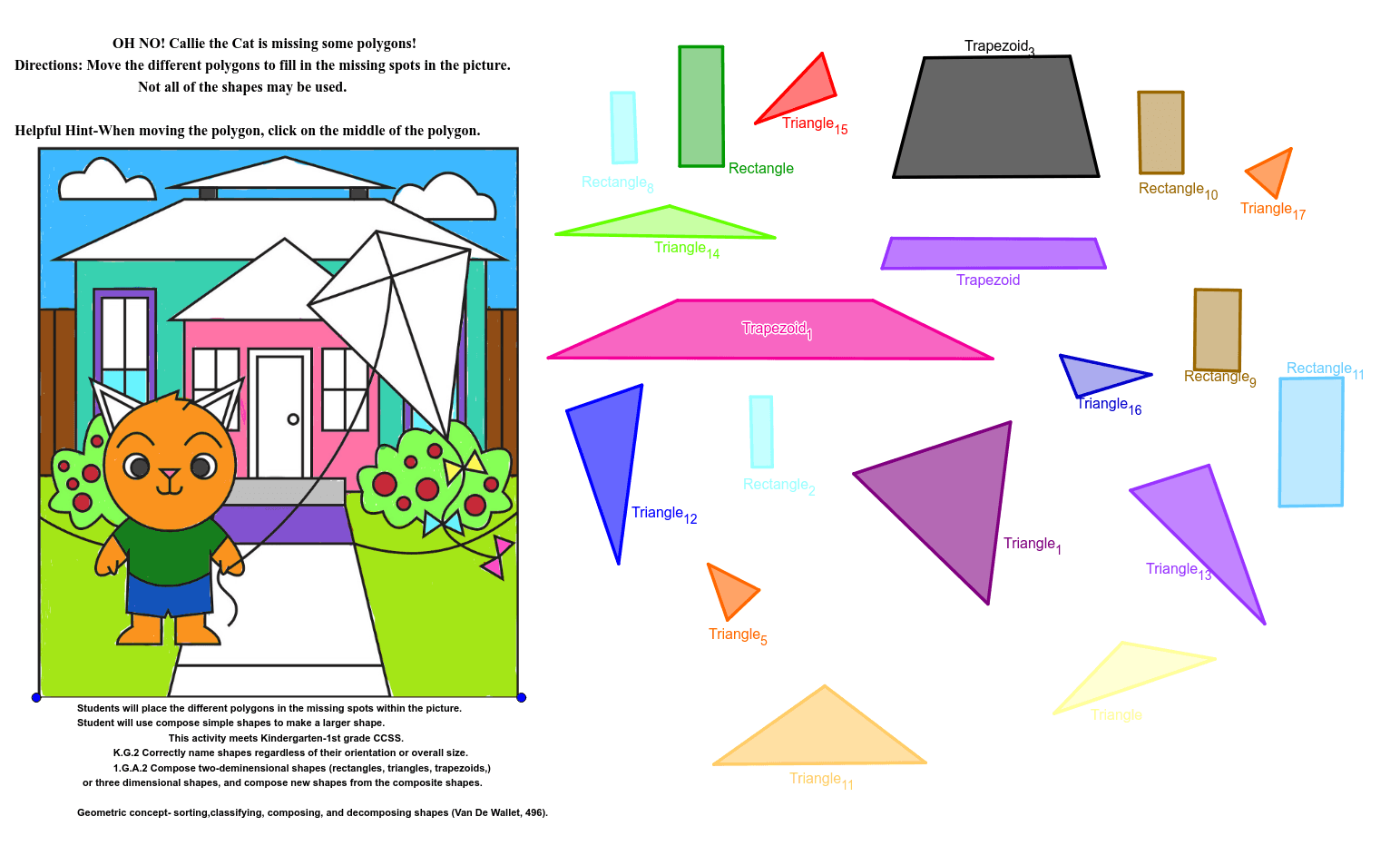
This example demonstrates how to fill in missing polygons within a given figure. It involves core mathematical concepts such as polygons, equations, quadratic functions, quadratic equations, volume, and piecewise functions. The construction utilizes GeoGebra commands and objects like Point and Polygon. It is suitable for high school students learning geometric constructions.
GeoGebra Commands & Parameters
Point(Circle[A_3, 4.7976730919163675]) → B_3Polygon(A_3, B_3, C_3, D_3) → Trapezoid_4, a_3, b_3, c_3, d_3Point(Circle[E_3, 4.008975512666096]) → F_3Polygon(E_3, F_3, G_3) → Triangle_{14}, g_3, e_3, f_3Point(Circle[H_3, 4.657552104464272]) → I_3Polygon(H_3, I_3, J_3) → Triangle_{11}, j_3, h_3, i_3Point(Circle[N_3, 1.5736493301325478]) → O_3Polygon(N_3, O_3, P_3) → poly5, p_3, n_3, o_3Point(Circle[Q_3, 2.8217615307867993]) → R_3Polygon(Q_3, R_3, S_3) → Triangle_{13}, s_3, q_3, r_3Point(Circle[T_3, 2.7221878484049857]) → U_3Polygon(T_3, U_3, V_3) → Triangle_{12}, v_3, t_3, u_3Point(Circle[W_3, 0.7726653838316267]) → Z_3Polygon(W_3, Z_3, A_4, B_4) → Rectangle_8, w_3, z_4, a_4, b_4Point(Circle[G_4, 1.515674330327962]) → H_4Polygon(G_4, H_4, I_4, J_4) → Rectangle_{10}, g_4, h_4, i_4, j_4Point(Circle[K_4, 1.5445367293641927]) → L_4Polygon(K_4, L_4, M_4, N_4) → Rectangle_9, k_4, l_4, m_4, n_4Point(Circle[O_4, 2.1450128079449797]) → P_4Polygon(O_4, P_4, Q_4, R_4) → Rectangle_{11}, o_4, p_4, q_4, r_4Point(Circle[S_4, 4.851998817260502]) → T_4Polygon(S_4, T_4, U_4, V_4) → Trapezoid_1, s_4, t_4, u_4, v_4Point(Circle[W_4, 3.3173249493970496]) → Z_4Polygon(W_4, Z_4, A_5) → Triangle_{15}, a_5, w_4, z_5Point(Circle[B_5, 1.540029445803641]) → C_5Polygon(B_5, C_5, D_5) → Triangle_{16}, d_5, b_5, c_5Point(Circle[E_5, 1.7265485382613106]) → F_5Polygon(E_5, F_5, G_5) → Triangle_{17}, g_5, e_5, f_5Point(Circle[H_5, 2.0257943441764636]) → I_5Polygon(H_5, I_5, J_5) → Triangle_5, j_5, h_5, i_5Point(Circle[C, 0.7149407218528125]) → DPolygon(C, D, K_3, L_3) → Rectangle_2, c, d, k_3, l_3Point(Circle[M_3, 5.661174939405696]) → D_4Polygon(M_3, D_4, E_4) → Triangle_1, e_4, m_3, d_4Point(Circle[P, 4.225628205665061]) → QPolygon(P, Q, R, S) → Trapezoid_3, p, q, r, sPoint(Circle[T_1, 1.086478133653952]) → U_1Polygon(T_1, U_1, F_2, C_4) → Trapezoid, t_1, u_1, f_2, c_4Point(Circle[Rectangle_4, 1.4722769097943167]) → K_5Polygon(Rectangle_4, K_5, L_5, M_5) → Rectangle, f_4, k_5, l_5, m_5Point(Circle[A, 3.366194046238461]) → BPolygon(A, B, E) → Triangle, e, a, b
AI Drawing Prompt Reference
Draw a figure containing multiple polygons and rectangles. Start by drawing a circle and taking a point A_3 on it. Then, draw a trapezoid with A_3 as one of its vertices. Continue by drawing circles and points, connecting them to form triangles, rectangles, and trapezoids. Finally, draw a triangle and a rectangle, ensuring all polygons and rectangles are connected to form a complete figure.
The prompt above was compiled from the original drawing commands and is for reference only.