
Explore - Chord Length
Loading the math board and drawing, please wait…
In collections
Unit 9 - Circles
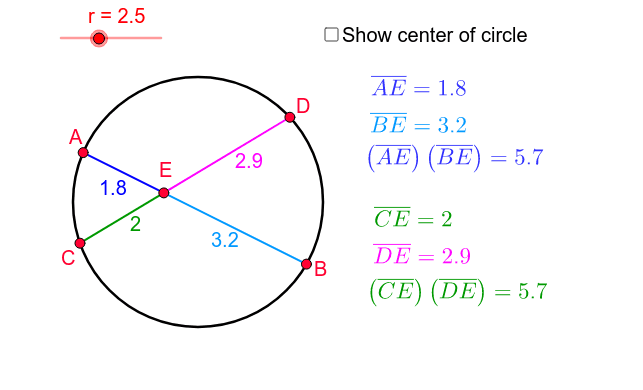
This example demonstrates the calculation and properties of chord lengths in a circle. It involves core mathematical concepts such as circles, chord length formulas, and intersecting chords theorem. Construction highlights include using GeoGebra commands like Circle, Point, Segment, and Intersect to build the circle and chords, and calculating the product of chord lengths. Suitable for high school mathematics education to understand geometric properties of circles and related theorems.
GeoGebra Commands & Parameters
Circle(O, r) → cPoint(c) → APoint(c) → BPoint(c) → CPoint(c) → DSegment(C, D) → aSegment(A, B) → bIntersect(b, a) → ESegment(A, E) → aeSegment(E, B) → beSegment(E, D) → deSegment(C, E) → ce
AI Drawing Prompt Reference
Draw a circle and place four points on it. Connect two of the points to form a chord, and connect the other two points to form another chord. Let the two chords intersect at a point. Draw lines from the intersection point to the endpoints of both chords, creating four smaller triangles that demonstrate the intersecting chords theorem.
The prompt above was compiled from the original drawing commands and is for reference only.