
Equilateral Triangles Inscribed in a Parabola
Loading the math board and drawing, please wait…
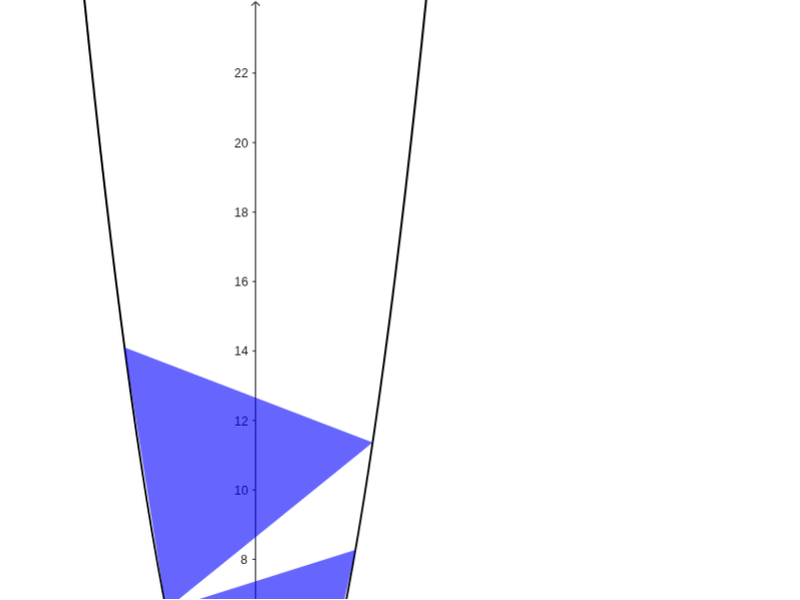
This example demonstrates how to inscribe an equilateral triangle on the graph of y = x^2. Using commands like Point, Rotate, Intersect, and Sequence, it illustrates the properties and construction of equilateral triangles. Suitable for high school mathematics education and learning.
GeoGebra Commands & Parameters
Point(c) → ARotate(c, -1.0471975511965976, A) → c'Rotate(c, 1.0471975511965976, A) → c'_1Intersect(c, c') → B, C, D, EIntersect(c, c'_1) → F, G, H, ISequence(Sequence[If[(abs(Distance[A, Element[list1, i]] - Distance[Element[list1, i], Element[list2, j]]) < 1.0E-6) ∧ (abs(Distance[A, Element[list1, i]] - Distance[A, Element[list2, j]]) < 1.0E-6) ∧ (abs(Distance[Element[list1, i], Element[list2, j]] - Distance[A, Element[list2, j]]) < 1.0E-6), Polygon[A, Element[list1, i], Element[list2, j]]], i, 1, 4], j, 1, 4) → list3
AI Drawing Prompt Reference
Draw a parabola y = x^2 and inscribe an equilateral triangle within it. Start by selecting a point A on the parabola, then rotate this point -1.0471975511965976 radians and 1.0471975511965976 radians around A to get points c' and c'_1. Find the intersections of c with c' and c with c'_1 to get points B, C, D, E and F, G, H, I. Finally, use these points to construct the equilateral triangle.
The prompt above was compiled from the original drawing commands and is for reference only.