
Division of Fractions
Loading the math board and drawing, please wait…
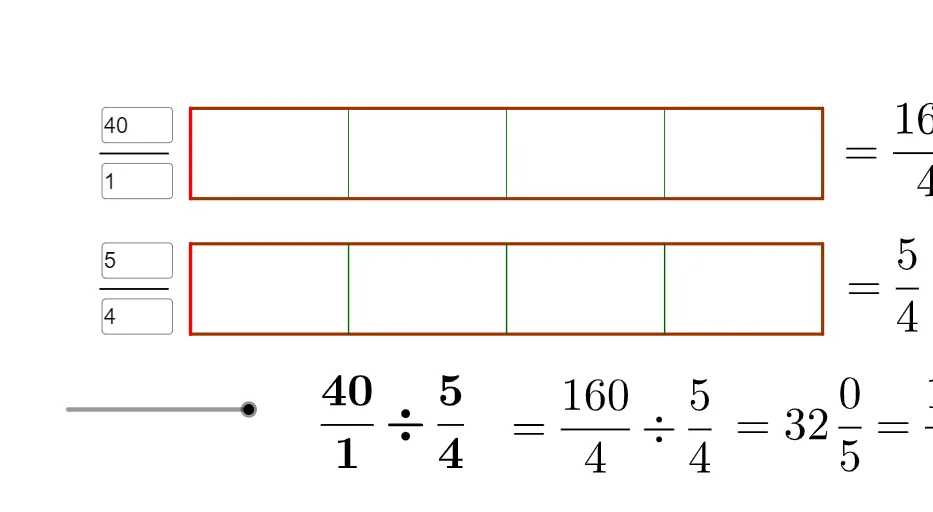
This example demonstrates the process of dividing fractions. Key mathematical concepts include fractions and division. Using GeoGebra commands such as LCM, DivPoint, and Polygon, a geometric model of fraction division is constructed. Suitable for middle school and above students to learn the concepts and operations of fraction division.
GeoGebra Commands & Parameters
LCM(b, d) → oDivPoint(B, C, o) → list8DivPoint(A, D, o) → list7Polygon(E, F, G, H) → poly2, e, f_2, g, hSegment(I, J) → iSegment(K, L) → jTextfield(a) → InputBox1Textfield(b) → InputBox2Textfield(c) → InputBox3Textfield(d) → InputBox4Polygon(A, D, C, B) → poly1, a_1, d_1, c_1, b_1DivPoint(A, D, b) → list1DivPoint(B, C, b) → list2DivPoint(E, F, d) → list3DivPoint(H, G, d) → list4Sequence(Segment[Element[list1, i], Element[list2, i]], i, 1, b) → list5Sequence(Segment[Element[list3, i], Element[list4, i]], i, 1, d) → list6Polygon(A, Element[list1, a], Element[list2, a], B) → poly3, a_2, k, l, b_2Polygon(E, Element[list3, c], Element[list4, c], H) → poly4, e_1, m, n, h_1DivPoint(E, F, o) → list9DivPoint(H, G, o) → list10Sequence(Segment[Element[list7, i], Element[list8, i]], i, 1, o) → list11Sequence(Segment[Element[list9, i], Element[list10, i]], i, 1, o) → list12Polygon(A, Element[list7, t], Element[list8, t], B) → poly5, q, r, f_1, g_1Sequence(Polygon[Element[list7, (t * i)], Element[list7, (t * (i + 1))], Element[list8, (t * (i + 1))], Element[list8, (t * i)]], i, 1, p - 1) → list13
AI Drawing Prompt Reference
Draw a geometric model for dividing fractions using two input fractions. Choose the division scale by using the least common multiple of the two denominators. Construct two line segments that serve as boundaries, then create division points along each segment at equal steps determined by the scale. Connect the corresponding division points to form polygon regions on both sides, producing filled block-like areas that represent the partition for each fraction and the aligned partition after the division. Add the connecting boundary edges so the top and bottom regions match the generated division points, yielding a clear visualization of fraction-division by matching and subdividing the blocks.
The prompt above was compiled from the original drawing commands and is for reference only.