
Divisibility Rules Practice for 2, 5, and 10
Loading the math board and drawing, please wait…
In collections
Teilbarkeitsregeln
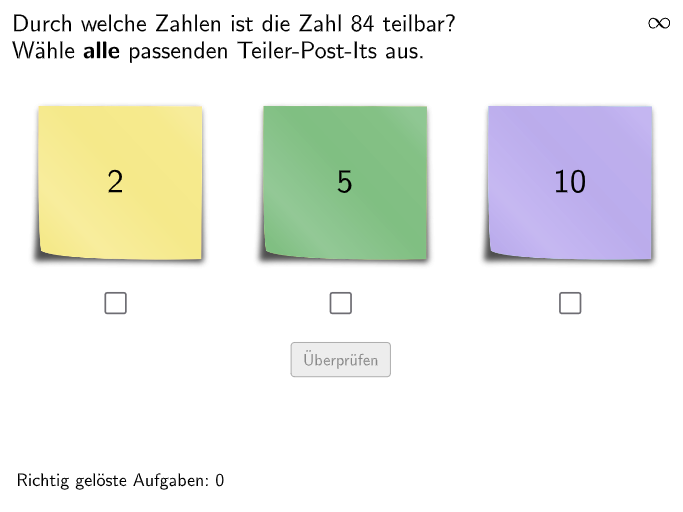
This is an interactive mathematics exercise demonstrating how to determine whether an integer is divisible by 2, 5, or 10. The core mathematical concept is divisibility rules and their practical application. Construction details: Using Textfield and InputBox to create input boxes for student numbers; employing Shuffle command to generate random practice problems (RandomList2, RandomList5, RandomList10); implementing conditional logic to check divisibility; using Text command with color feedback (Blue, Green, Orange, Red, etc.) to display correct answers and error prompts; setting up validate, showanswer, and showsolution buttons for verification, answer display, and solution explanation. Suitable for grades 5-6 students, can be used for classroom practice or homework reinforcement to train students' mastery of divisibility rules and practical application abilities.
GeoGebra Commands & Parameters
Textfield(input1) → InputBox1Textfield(input2) → InputBox2Shuffle(Sequence[Element[Shuffle[Sequence[(k * 2), k, 1, 50] \ Shuffle[Sequence[(k * 10), k, 1, 10]]], i], i, 1, 5]) → RandomList2, {14, 64, 84, 6, 38}Shuffle(Sequence[Element[Shuffle[Sequence[(k * 5), k, 1, 20] \ Shuffle[Sequence[(k * 10), k, 1, 10]]], i], i, 1, 5]) → RandomList5, {25, 45, 5, 15, 95}Shuffle(Sequence[Element[Shuffle[Sequence[(k * 10), k, 1, 10]], i], i, 1, 5]) → RandomList10, {80, 90, 30, 40, 80}Shuffle(Join[{RandomList2, RandomList5, RandomList10}]) → RandomListNum, {84, 25, 90, 45, 6, 64, 5, 80, 95, 38, 30, 14, 80, 40, 15}Polygon(PtopLeftCornerFeedback, PtopRightCornerFeedback, PbottomRightCornerFeedback, PbottomLeftCornerFeedback) → rectangleCorrect, rectangleCorrectS3, rectangleCorrectS4, rectangleCorrectS2, rectangleCorrectS1Shuffle(Sequence[Random[0, 10], i, 1, 100]) → randomNosForX, {7, 1, 10, 9, 5, 4, 8, 3, 6, 7, 9, 8, 5, 3, 9, 2, 1, 1, 2, 9, 8, 4, 6, 10, 10, 4, 7, 3, 10, 7, 2, 0, 0, 10, 3, 3, 3, 10, 2, 2, 4, 8, 3, 4, 7, 7, 8, 6, 3, 9, 3, 8, 7, 1, 1, 2, 5, 3, 6, 3, 7, 2, 4, 7, 0, 0, 7, 3, 9, 9, 5, 0, 7, 2, 8, 8, 4, 8, 4, 1, 7, 7, 4, 10, 8, 0, 3, 6, 2, 3, 7, 2, 3, 3, 8, 8, 10, 1, 0, 1}Element(randomNosForX, Mod[questionCount, 100] + 1) → numXShuffle(Sequence[Random[0, 10], i, 1, 100]) → randomNosForY, {7, 9, 7, 4, 3, 1, 0, 4, 9, 9, 5, 10, 9, 10, 9, 9, 0, 8, 9, 3, 5, 0, 10, 3, 7, 2, 7, 10, 1, 2, 7, 9, 6, 0, 7, 8, 9, 6, 4, 4, 3, 8, 9, 7, 3, 3, 10, 6, 0, 9, 5, 2, 1, 0, 8, 8, 6, 8, 10, 1, 8, 1, 2, 10, 8, 1, 4, 4, 7, 6, 5, 2, 4, 2, 6, 0, 2, 9, 10, 2, 9, 10, 6, 7, 3, 10, 0, 1, 10, 3, 2, 10, 2, 2, 8, 9, 4, 10, 7, 0}Element(randomNosForY, Mod[questionCount, 100] + 1) → numYAppend(true, Sequence[If[randomNosForX(i) ≟ randomNosForX(i - 1), false, true], i, 2, 100]) → stayXAppend(true, Sequence[If[randomNosForY(i) ≟ randomNosForY(i - 1), false, true], i, 2, 100]) → stayYRemove(Sequence[If[stayX(i), randomNosForX(i), 0], i, 1, 100], Sequence[0, i, 1, 100]) → randomNosForXwithoutRepeatRemove(Sequence[If[stayY(i), randomNosForY(i), 0], i, 1, 100], Sequence[0, i, 1, 100]) → randomNosForYwithoutRepeatElement(randomNosForXwithoutRepeat, Mod[questionCount, Length[randomNosForXwithoutRepeat]] + 1) → numXwithoutRepeatElement(randomNosForYwithoutRepeat, Mod[questionCount, Length[randomNosForYwithoutRepeat]] + 1) → numYwithoutRepeatShuffle({1, 2}) → Vis1, {2, 1}Shuffle({1, 2}) → Vis2, {2, 1}Shuffle({1, 2}) → Vis3, {1, 2}Corner(PostIt11, 3) → PostIt1_3Corner(PostIt11, 4) → PostIt1_4Corner(PostIt21, 3) → PostIt2_3Corner(PostIt21, 4) → PostIt2_4Corner(PostIt31, 3) → PostIt3_3Corner(PostIt31, 4) → PostIt3_4Text(correctText, CorrP, false, true, 0, 0) → Text4
AI Drawing Prompt Reference
Make an interactive math practice layout for divisibility rules. Place two input fields for the student to enter the numbers to check. Then generate three groups of practice integers intended for tests of divisibility by 2, 5, and 10. Construct a rectangular feedback area by defining its four corners (top-left, top-right, bottom-right, bottom-left) to frame the “correct”/feedback region. Add a visible text element that will present the answer or error prompt with color-based correctness feedback. Present the generated numbers together with this feedback rectangle so students can validate their choices.
The prompt above was compiled from the original drawing commands and is for reference only.