
Derivative Template
Loading the math board and drawing, please wait…
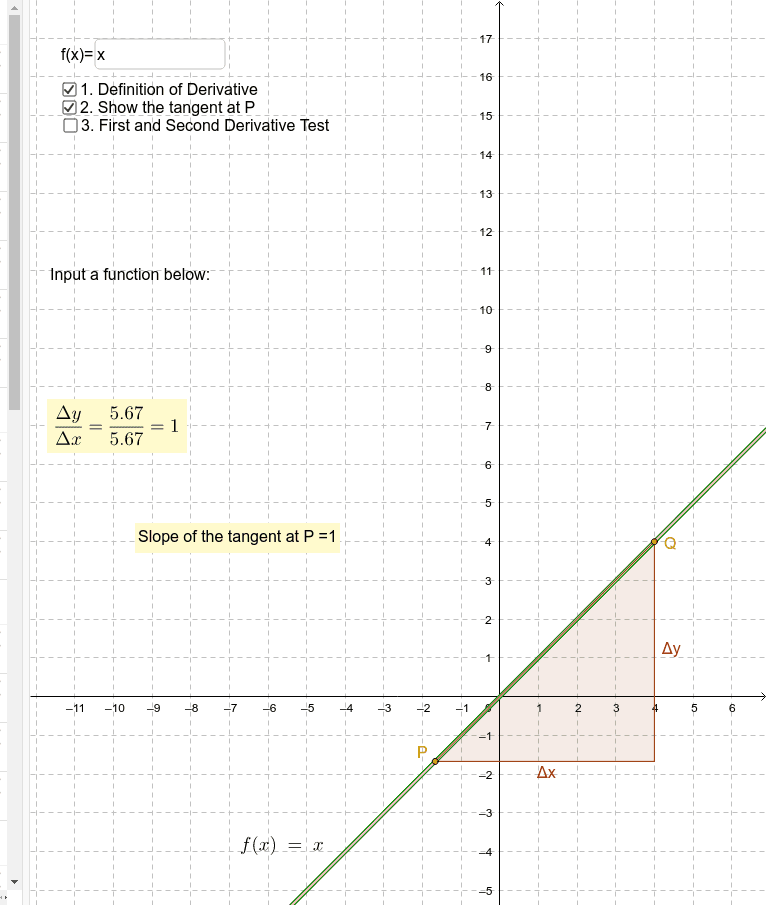
This example demonstrates the derivative of a function and its geometric meaning, showing the tangent line and derivative value in real-time as a dynamic point P moves along the function f(x); Core math concepts include derivatives, tangents, function graphs, and geometric constructions; Construction highlights involve commands like Point, Derivative, Line, OrthogonalLine, Intersect, Polygon in GeoGebra to build the function, dynamic point, tangent, intersections, and polygons; Suitable for high school and above students learning calculus, function analysis, and geometric intuition.
GeoGebra Commands & Parameters
Point(f) → PDerivative(f) → gDerivative(g) → hTextfield(f) → inputBox1Point(f) → QLine(Q, P) → jOrthogonalLine(Q, xAxis) → kOrthogonalLine(P, yAxis) → lIntersect(k, l) → APolygon(Q, A, P) → poly1, p, q, a_1
AI Drawing Prompt Reference
Draw the graph of function f(x) and drag a point P on it to show its derivative g(x) and the second derivative h(x). As point P moves, draw the tangent line j and a vertical line k to the x-axis, and a vertical line l to the y-axis, which intersect at point A. Finally, use points Q, A, and P to draw a triangle.
The prompt above was compiled from the original drawing commands and is for reference only.