
Conversion Between Degrees and Radians
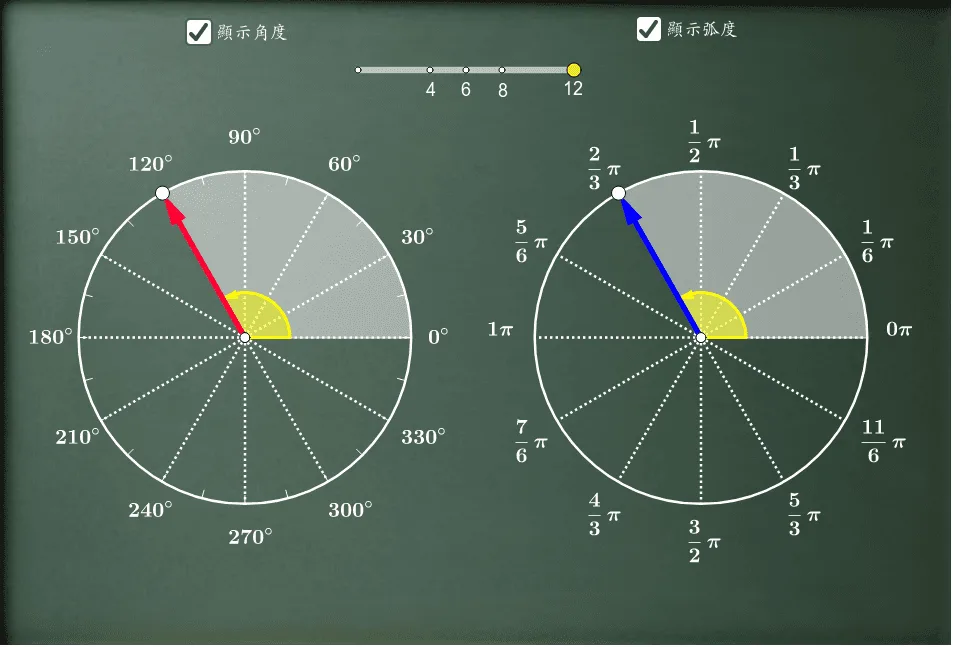
This GeoGebra applet visually demonstrates the conversion between degrees and radians. By constructing geometric objects such as circles, sectors, vectors, and line segments, combined with slider animations, it dynamically illustrates the corresponding numerical values and geometric meanings of degree and radian measures. It helps learners deeply understand the mathematical relationship between arc length, radius, and central angle. The applet features an interactive unit circle at its core, where students can adjust a slider to change the angle measure and immediately see the corresponding value switch between degrees and radians on a digital display. A colored sector highlights the region swept by the angle, reinforcing the connection between angular measure and the proportion of the circle covered. Vectors extend from the center to the terminal point on the circle, providing a visual link to trigonometric ratios such as sine and cosine. Line segments represent the arc length formed by the angle, making the formula s equals r theta tangible and concrete. As students manipulate the slider, they observe how increasing the angle in degrees proportionally increases the angle in radians, solidifying the conversion factor of pi over eighteen degrees equals one radian. This dynamic visualization transforms an abstract concept into an intuitive and memorable learning experience. The applet is an excellent visual teaching tool for foundational concepts in trigonometry and analytic geometry. It supports both classroom instruction and independent exploration, allowing students to build a robust conceptual understanding that will serve them throughout their mathematics studies.
Loading the math board and drawing, please wait…