
Comparing Fractions Using Area Model (Bilingual)
Loading the math board and drawing, please wait…
In collections
Fractions الكسور
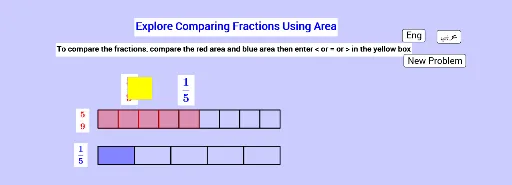
① This interactive GeoGebra example demonstrates how to compare fractions using an area model, where a unit area is divided into equal parts and shaded to represent each fraction. ② Core mathematical concepts include fraction meaning, equivalent fractions, and comparison (greater than, less than, equal), linking symbolic fractions to geometric area representations. ③ Construction details: uses Random to generate random fractions, Vector and Sequence to build the area grid, Textfield and inputBox1 for user input, If with logical objects (Less, Eq, More) to determine comparison results, buttons (button1/2/3) for language switching (Arabic/English) and verification, list objects for multiple-choice options, and feedback objects (Sawab, GoodAns, Bad, Good) to indicate correctness. ④ Suitable for upper elementary to middle school students learning fraction concepts and comparison, as well as for bilingual math instruction or self-paced practice, with interactive feedback to reinforce understanding.
GeoGebra Commands & Parameters
Random(2, 20) → bRandom(1, b) → aRandom(2, 20) → dVector((0, 2)) → jRandom(1, d) → cSequence(Rectangle[20 / b, ((k * 20 / b) - 5, 2), ((k * 20 / b) - 5, 0)], k, 0, b - 1) → list1Sequence(Rectangle[20 / b, ((k * 20 / b) - 5, 2), ((k * 20 / b) - 5, 0)], k, 0, a - 1) → list2Sequence(Rectangle[20 / d, ((k * 20 / d) - 5, -2), ((k * 20 / d) - 5, -4)], k, 0, d - 1) → list5Sequence(Rectangle[20 / d, ((k * 20 / d) - 5, -2), ((k * 20 / d) - 5, -4)], k, 0, c - 1) → list3Textfield(Comp) → inputBox1If(Sawab, Good, Bad) → VerifIf(Less, "<", If[More, ">", "="]) → GoodAns
AI Drawing Prompt Reference
Draw an area model to compare two randomly generated fractions. First, generate the numerators and denominators for the fractions. Use rectangles to represent each fraction. Color the rectangles for the first fraction and leave the rectangles for the second fraction uncolored. The user needs to input the comparison symbol (greater than, less than, or equal) and receive feedback based on their input. The rectangles should be divided according to the denominator, and the rectangles for the first fraction should be colored, while those for the second fraction should remain uncolored.
The prompt above was compiled from the original drawing commands and is for reference only.