
Comparing Areas of Shapes with Equal Perimeters
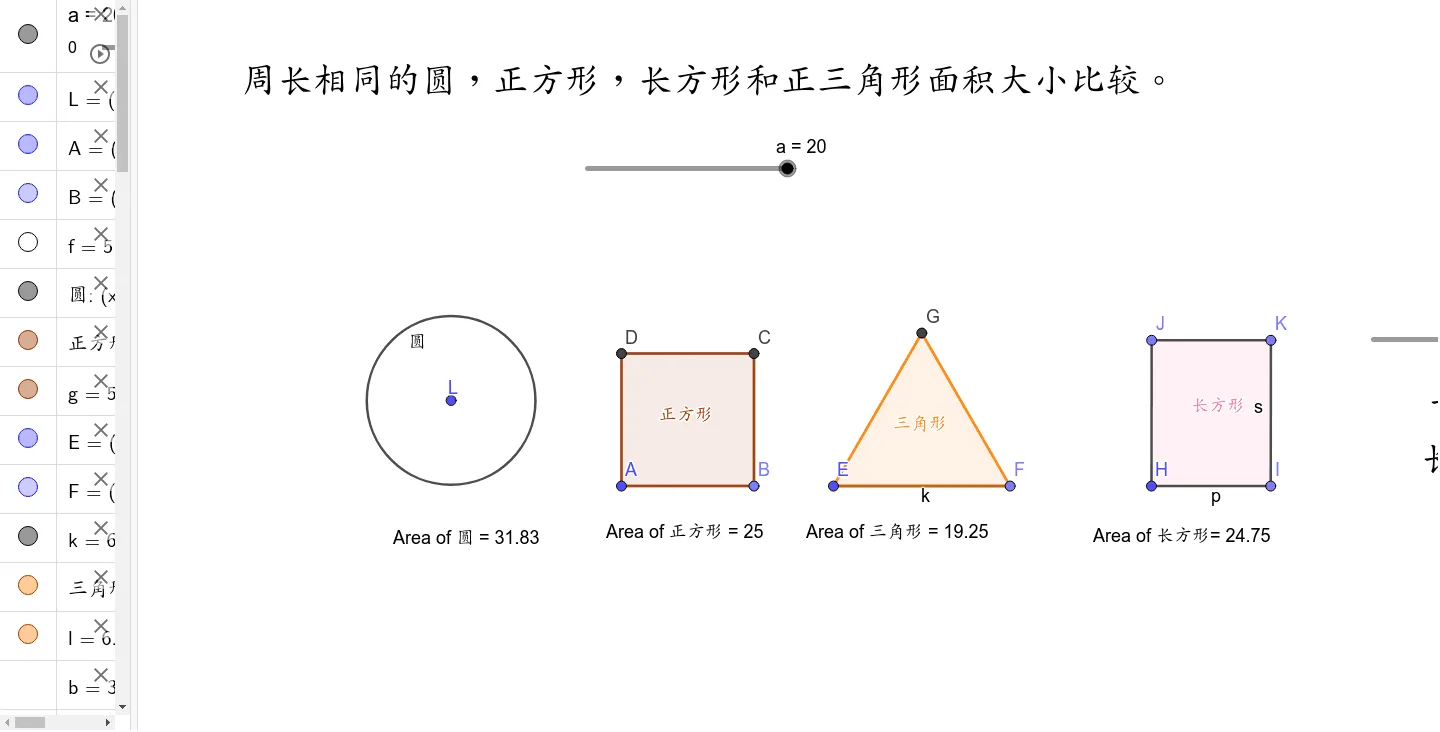
This interactive GeoGebra applet provides a compelling visual and dynamic exploration of the classic isoperimetric theorem, specifically focusing on the relationship between perimeter and area across different geometric shapes. The primary objective of this tool is to demonstrate that among all closed shapes with a given perimeter, the circle encloses the maximum possible area. By placing a square, a rectangle, an equilateral triangle, and a circle side by side under the strict constraint of an identical perimeter, the applet allows students to intuitively compare their respective areas.
Through dynamic construction and interactive controls, users can manipulate the shared perimeter using a slider, watching as all four shapes scale proportionally while maintaining their equal perimeter constraint. A key interactive feature involves the rectangle. Users can adjust its aspect ratio, dynamically altering its length and width. As the rectangle becomes more elongated, students will immediately observe its area decreasing, reinforcing the concept that for a fixed perimeter, a square yields the maximum area among all rectangles. The applet displays real-time numerical calculations for both the perimeter and the area of each shape, alongside visual overlays that make the area disparities strikingly obvious.
Mathematically, this applet serves as a concrete introduction to the isoperimetric inequality and geometric optimization. It clearly establishes the hierarchy of areas for these specific regular and irregular shapes. The circle possesses the largest area, followed by the square, then the equilateral triangle, and finally the rectangle, whose area fluctuates based on its proportions. This visual hierarchy helps students grasp the deeper principle that as a regular polygon increases its number of sides, its area approaches that of a circle, making the circle the ultimate optimal shape for enclosing space.
For students and educators, this applet is an invaluable pedagogical tool. It transforms abstract algebraic formulas and calculus-based optimization problems into tangible, visual experiences. Instead of merely memorizing that a circle is the most efficient shape, learners can actively experiment and discover this truth for themselves. It bridges the gap between basic geometry and advanced mathematical concepts, fostering a deeper conceptual understanding of efficiency, limits, and extrema. Whether used in a middle school geometry class to compare basic shapes or in a high school calculus course to introduce optimization and the isoperimetric problem, this applet provides a rich, engaging environment for mathematical discovery.
Loading the math board and drawing, please wait…