
Area Model for Fraction Multiplication
Loading the math board and drawing, please wait…
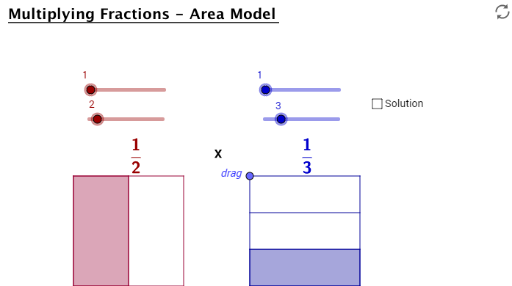
This example demonstrates fraction multiplication using an area model. Key mathematical concepts include fractions and multiplication. GeoGebra commands such as Max, Sequence, Segment, and Point are used to construct the model. Suitable for upper elementary or middle school students learning fraction multiplication.
GeoGebra Commands & Parameters
Max(Sequence[If[Mod[(a * c), i] + Mod[(b * d), i] ≟ 0, i, -1], i, 1, Min[{(a * c), (b * d)}]]) → Simplified_{GCF}Sequence(A + (t * (B - A)), t, 0, 1, 1 / b) → L1Sequence(C + (t * (D - C)), t, 0, 1, 1 / b) → L2Segment(A, B) → c_1Segment(C, D) → d_1Sequence(Segment[Element[L1, k], Element[L2, k]], k, 2, b) → L5Segment((0, 3), (4.8, 3)) → ePoint(e) → HSegment(H, E) → fSegment(E, F) → gSegment(F, G) → hSegment(G, H) → iSegment(D, B) → jSegment(C, A) → kElement(L1, a + 1) → T1Element(L2, a + 1) → T2Polygon(A, T1, T2, C) → poly1, a_1, t1, t2, c_2Sequence(E + (t * (H - E)), t, 0, 1, 1 / d) → L3Sequence(F + (t * (G - F)), t, 0, 1, 1 / d) → L4Sequence(Segment[Element[L3, k], Element[L4, k]], k, 2, d) → L6Element(L3, c + 1) → T3Element(L4, c + 1) → T4Polygon(E, F, T4, T3) → poly2, e_1, f_1, t4, t3
AI Drawing Prompt Reference
Draw an area model for fraction multiplication. Start by drawing two vertical lines to divide the rectangle into smaller rectangles. Then add horizontal lines to further divide the rectangle. Next, draw two smaller rectangles representing the product of fractions and connect their vertices with segments to form a complete area model.
The prompt above was compiled from the original drawing commands and is for reference only.