
Area and Perimeter of a Rectangle: Dynamic GeoGebra Construction
Loading the math board and drawing, please wait…
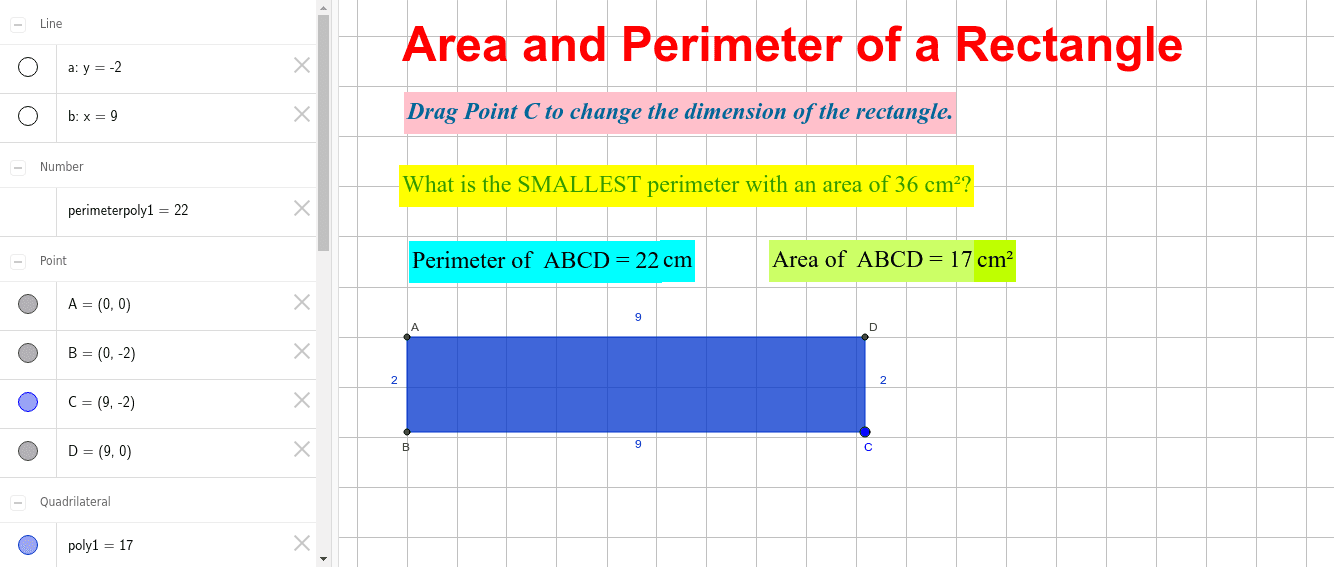
This example demonstrates the dynamic calculation of area and perimeter for a rectangle. Key mathematical concepts involve rectangle properties, area formulas, and perimeter formulas. Construction utilizes GeoGebra commands such as Intersect for vertices, OrthogonalLine for perpendicular sides, Polygon for the shape, and Perimeter for real-time calculation. It also includes PointIn for point containment checks. Suitable for middle school and high school students to visualize geometric measurements and support geometry education.
GeoGebra Commands & Parameters
Intersect(xAxis, yAxis) → AOrthogonalLine(C, yAxis) → aOrthogonalLine(C, xAxis) → bIntersect(a, yAxis) → BIntersect(b, xAxis) → DPolygon(A, B, C, D) → poly1, a_1, b_1, c, dPointIn(poly1) → Pointpoly1_1PointIn(poly1) → Pointpoly1_2Perimeter(poly1) → perimeterpoly1PointIn(poly1) → Pointpoly1_3PointIn(poly1) → Pointpoly1
AI Drawing Prompt Reference
Draw a rectangle and dynamically display its area and perimeter. Start by plotting the coordinate axes and finding their intersection point. Then draw perpendicular lines from this point to both axes to get the other two vertices of the rectangle. Connect these four points to form the rectangle, place two points inside it, and calculate and show the perimeter of the rectangle.
The prompt above was compiled from the original drawing commands and is for reference only.