
Area and Perimeter Dilation Relation
Loading the math board and drawing, please wait…
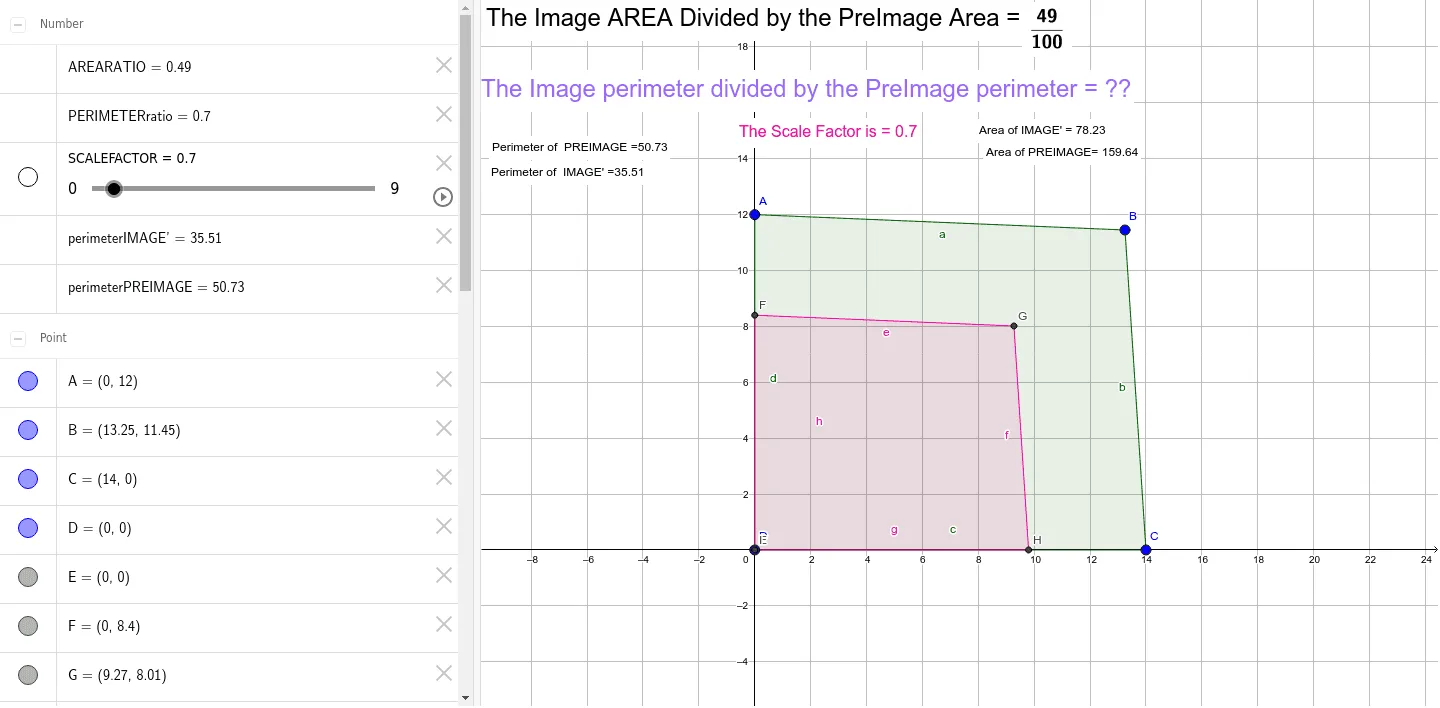
This GeoGebra example dynamically illustrates how the area and perimeter of a shape (such as a scalene triangle) change under a dilation with a variable scale factor. The core mathematical concept is the proportional relationship in similarity transformations: perimeter scales linearly with the factor, while area scales with its square. The construction uses a slider for the scale factor (SCALEFACTOR), commands like Intersect, Polygon, Perimeter, and FractionText to build the preimage and image, and displays the area ratio and perimeter ratio as fractions for direct comparison. It is suitable for middle or high school geometry and function lessons, helping students grasp how scaling affects metric properties and supporting explorations in optimization problems involving area-perimeter trade-offs.
GeoGebra Commands & Parameters
Intersect(xAxis, yAxis) → EPolygon(A, B, C, D) → PREIMAGE, a, b, c, dPolygon(Dilate[A, SCALEFACTOR, E], Dilate[B, SCALEFACTOR, E], Dilate[C, SCALEFACTOR, E], Dilate[D, SCALEFACTOR, E]) → IMAGE', e, f, g, hPerimeter(PREIMAGE) → perimeterPREIMAGEPointIn(PREIMAGE) → PointPREIMAGE_1Perimeter(IMAGE') → perimeterIMAGE'PointIn(IMAGE') → PointIMAGE'_1PointIn(IMAGE') → PointIMAGE'_2PointIn(PREIMAGE) → PointPREIMAGEPointIn(IMAGE') → PointIMAGE'FractionText(AREARATIO) → Text6Intersect(e, h) → FIntersect(e, f) → GIntersect(f, g) → HIntersect(g, h) → I