
Working with Temperature - Level 1
Loading the math board and drawing, please wait…
In collections
Negative Zahlen - Einführung
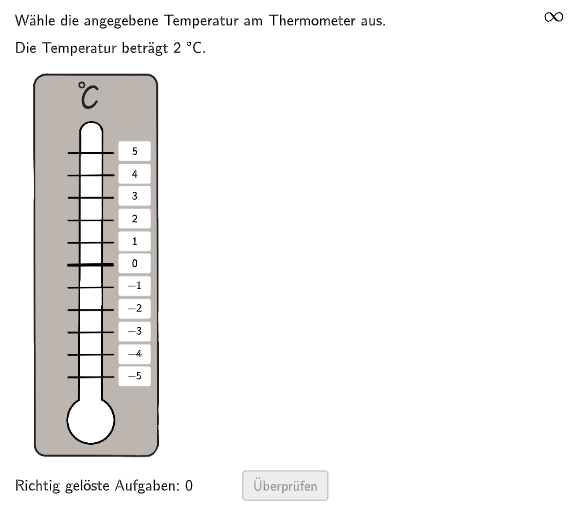
This example demonstrates how to compare different temperatures. Students can adjust temperature values to observe temperature changes. Key math concepts include comparing and ordering integers, as well as interpreting integers in real-world situations. Construction points include using GeoGebra commands such as Join, Sequence, Textfield, etc. to create temperature lists and random number lists. Suitable for 5-6 grade level.
GeoGebra Commands & Parameters
Join({-5…5, -5…0}) → TempList1Sequence(RandomElement[TempList1], k, 1, 200) → RTList1, {2, 1, 5, -5, -2, -2, 3, 4, 3, 4, -3, -1, 0, 3, 2, -3, 5, 4, 3, -5, 0, 4, 4, 4, 2, -5, -5, 5, -1, 3, -1, -4, -1, 0, -2, -1, 4, 2, -2, -1, -5, -4, -3, 3, -3, 3, -4, 0, -5, -2, 5, 4, 3, -2, 0, -4, -5, 3, 1, 1, -3, -3, 4, -5, -1, -2, 5, 0, -5, -2, 4, -5, -4, 1, 4, -3, -4, -2, 4, 2, -1, -5, -1, 1, -5, 3, 5, -1, 1, 5, 3, -3, -3, 4, -5, 2, -4, -4, -3, 0, 0, -2, -2, 1, -4, -3, 4, 3, 3, -5, -1, -4, 4, -2, -4, -5, -5, -4, 0, -4, -3, 2, -1, -4, 5, -3, -2, 5, 5, -4, -2, -1, 3, 0, -5, -3, -3, -4, -2, -2, -3, -5, -3, -4, -3, -1, 0, -4, -5, -1, 2, 4, -2, 5, -3, -5, 5, -2, 0, -3, 5, -5, -4, 0, 0, 2, -4, -3, -2, -5, -2, -3, -1, 3, -5, 5, -5, -1, 2, 5, -2, -5, -1, 1, -3, -2, 0, -5, -1, 4, 4, -3, 1, 3, -4, -1, 0, -3, -2, -4}Textfield(input2) → InputBox2If(Case ≟ 1, input1 ≟ temp1, input2 ≟ temp2 ∧ Text[InputBox2] ≠ "-0") → correctSequence(Random[1, 10], i, 1, 10) → randomNumbers, {8, 6, 3, 2, 6, 4, 8, 3, 7, 7}Element(randomNumbers, Mod[questionCount, Length[randomNumbers]] + 1) → randomNumberIf(Case ≟ 1, Defined[input1], Defined[input2]) → clickableBtnValidateIf(Case ≟ 1, PosImg11 + (4.25, 1.5), (8.75, 7.5)) → PosFBTextIf(Case ≟ 1, (6, -2.125), (8.75, 7)) → PosBtnValidate
AI Drawing Prompt Reference
Create a diagram showing temperature comparison with two temperature lists: one ranging from -5 to 5 integers, and another consisting of 200 randomly selected values from the first list. Include an input box for users to enter temperature values, with conditional feedback indicating correctness. Generate 10 random numbers and display one based on the question number. Place two buttons and a feedback text box at specified positions.
The prompt above was compiled from the original drawing commands and is for reference only.