
Thales' Theorem and Circle Center
Loading the math board and drawing, please wait…
In collections
Thales' Theorem
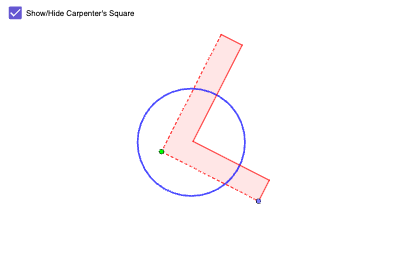
This example demonstrates the application of Thales' Theorem in constructing the center of a circle. Key mathematical concepts include similar triangles and circle properties. Construction involves GeoGebra commands such as Segment, OrthogonalLine, Circle, etc. Suitable for middle or high school mathematics education to understand geometric and functional relationships.
GeoGebra Commands & Parameters
Segment(B, E) → fOrthogonalLine(E, f) → gPoint(g) → FOrthogonalLine(F, g) → hPoint(h) → GCircle(B, Segment[F, G]) → cLine(G, g) → iLine(B, i) → jIntersect(c, j, 1) → HLine(H, f) → kCircle(E, Radius[c]) → dIntersect(d, k, 1) → IIntersect(i, k) → JCircle(Q, R) → qPointIn(q) → SPolygon(E, B, H, J, G, F) → poly3, e_1, b_1, h_2, j_2, g_2, f_2Point(Circle[S, Segment[E, B]]) → TRotate(T + (Segment[B, H], 0), Angle[H - B] + Angle[T - S] - Angle[B - E], T) → URotate(U + (Segment[H, J], 0), Angle[J - H] + Angle[U - T] - Angle[H - B], U) → VRotate(V + (Segment[J, G], 0), Angle[G - J] + Angle[V - U] - Angle[J - H], V) → WRotate(W + (Segment[G, F], 0), Angle[F - G] + Angle[W - V] - Angle[G - J], W) → ZPolygon(S, T, U, V, W, Z) → poly4, s, t, u, v, w, z_1
AI Drawing Prompt Reference
Draw a circle and determine its center. Start with a segment, construct a perpendicular line at one endpoint, pick a point on it, then draw another perpendicular through that point and pick another point. Use the first endpoint as center and the distance between the two picked points as radius to draw a circle. Connect points with lines, intersect with the circle to get new points, and construct more perpendiculars. Finally, form a polygon from several points and inside it construct a similar polygon, illustrating Thales' theorem and similar triangles.
The prompt above was compiled from the original drawing commands and is for reference only.