
Representing the Irrational Number π on the Number Line
Loading the math board and drawing, please wait…
In collections
Minority Pi: Interactive Math Applets
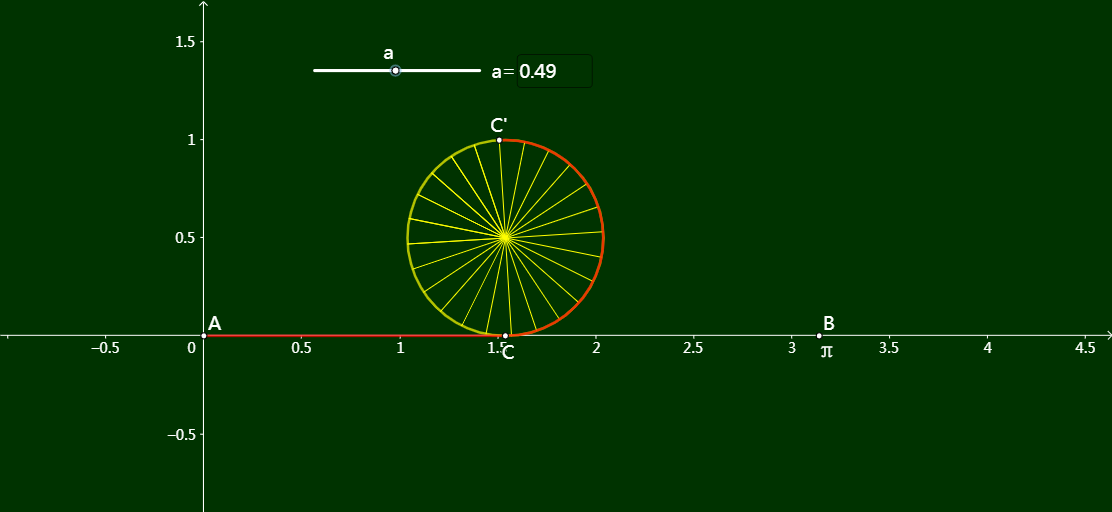
This applet demonstrates how to represent the irrational number π on the number line through an interactive geometric construction. The core concept relies on the fundamental definition of π as the ratio of a circle's circumference to its diameter. By constructing a circle with diameter 1 and rolling it along the number line for exactly one complete revolution, the point where the circle first touches the line again marks the position of π. This elegant construction bridges the abstract notion of an irrational number with a tangible, visual process. The dynamic nature of the applet allows students to observe each step of the rolling motion in real time, reinforcing the connection between circular geometry and the real number system. Interactive controls let learners adjust parameters, restart the animation, and trace the path of the circle as it rolls, deepening their understanding of why π is an irrational number that cannot be expressed as a simple fraction yet has a precise location on the number line. The construction also highlights the inherent relationship between π and circles, showing that π is not merely an algebraic constant but a geometric quantity derived from the properties of circular figures. This visualization serves as an effective teaching tool for middle school and high school mathematics courses, where students are introduced to irrational numbers and the real number line. By combining static geometric reasoning with dynamic animation, the applet supports multiple modes of learning, from guided classroom demonstration to independent exploration. It helps learners move beyond memorizing the decimal approximation of π toward developing a deeper conceptual understanding of what π represents and how it fits within the broader framework of real numbers.
GeoGebra Commands & Parameters
Point(Segment[A, B], a) → CSegment(A, C) → fRotate(C, (-2 * f), D) → C'Circle(D, C) → cCircleArc(D, C, C') → dTextfield(a) → InputBox1Sequence(Segment[D, Rotate[C', (t * π / 12), D]], t, 1, 30) → l1
AI Drawing Prompt Reference
Draw a number line and mark the position of π. Draw a circle with a diameter of 1, then simulate the rolling of the circle along the number line for one complete revolution. The point where the circle touches the line again after rolling is the position of π. Show this rolling animation to help understand the geometric meaning of π as an irrational number.
The prompt above was compiled from the original drawing commands and is for reference only.