
Quiz on Naming Congruent and Similar Triangles
Loading the math board and drawing, please wait…
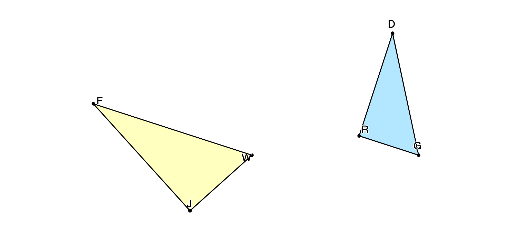
This interactive GeoGebra quiz focuses on naming congruent and similar triangles. It randomly generates and transforms triangles via rotations and reflections, challenging students to correctly identify and name corresponding vertices. By integrating polygons, angles, and geometric transformations, it helps students master triangle congruence and similarity naming conventions, boosting geometric intuition and proof readiness.
In this applet, learners are presented with triangles that have been subjected to various rigid motions or scale transformations. Some tasks ask students to name the congruent triangle and its corresponding vertices, while others require identifying the similar triangle and writing the correct similarity statement with proper correspondence. The quiz provides immediate feedback so students can self-correct and reinforce their understanding.
The mathematical core of the applet revolves around two central concepts. First, triangle congruence requires that all corresponding sides and angles are equal, and vertices must be listed in matching order when writing statements such as triangle ABC is congruent to triangle DEF. Second, triangle similarity requires proportional corresponding sides and equal corresponding angles, with the same emphasis on correct vertex ordering in statements like triangle ABC is similar to triangle DEF. The random generation of triangles in different orientations ensures that students cannot rely on memorized visual patterns but must instead reason from the given angle and side relationships.
Geometric transformations including rotations, reflections, translations, and dilations are used to reposition the triangles, making the correspondence less obvious and helping students develop flexible spatial reasoning. This directly supports the development of proof-writing skills, since correctly identifying corresponding parts is the essential first step in constructing a valid geometric proof.
The applet is designed for high school geometry classrooms and can be used for formative assessment, homework practice, or independent study. Teachers can customize the difficulty by adjusting the number of sides, the types of transformations applied, or whether both congruence and similarity are mixed in the same session. The randomized nature of each attempt means students can practice repeatedly with different problems, building fluency and confidence in a foundational topic that recurs throughout the entire geometry curriculum.
GeoGebra Commands & Parameters
Sequence(30° + ((i * 10))°, i, 0, 12) → listAlphaRandomElement(listAlpha) → αSequence(((i * 10))°, i, 1, (180 - α / °) / 10 - 1) → listBetaRandomElement(listBeta) → βRandomElement({0.75, 1, 1.25}) → kRotate(A, β, O) → A'Line(O, A') → LineOA'Rotate(O, (-α), A) → O'Line(A, O') → LineAO'Intersect(LineOA', LineAO') → BCircle(O'', (Distance[O, B] * k)) → cRotate(Dilate[Translate[A, Vector[O, O'']], k, O''], If[rotate, theta, 0°], O'') → A''Circle(A'', (Distance[A, B] * k)) → dIntersect(c, d, 1) → B''1Intersect(c, d, 2) → B''2If(reflect, B''1, B''2) → B''Max({Distance[A, B], Distance[A, O], Distance[O, B]}) → maxLengthPolygon(O, A, B) → poly1, b_1, c_1, a_1Shuffle({"D", "E", "F", "G", "H", "J", "K", "L", "M", "N", "P", "Q", "R", "S", "T", "V", "W", "X", "Y"}) → listLetterAngle(poly1) → angleO, angleA, angleBPolygon(B'', O'', A'') → poly2, a_2, b_2, c_2Angle(poly2) → angleB'', angleO'', angleA''Take(listLetter, 1, 3) → listQuestionAppend("?", Sort[Take[listLetter, 4, 6]]) → listAnswer1Append("?", Sort[Take[listLetter, 4, 6]]) → listAnswer2Append("?", Sort[Take[listLetter, 4, 6]]) → listAnswer3If(SelectedElement[listAnswer1] ≟ listLetter(4), angleO'', SelectedElement[listAnswer1] ≟ listLetter(5), angleA'', SelectedElement[listAnswer1] ≟ listLetter(6), angleB'', 0°) → ans1If(SelectedElement[listAnswer2] ≟ listLetter(4), angleO'', SelectedElement[listAnswer2] ≟ listLetter(5), angleA'', SelectedElement[listAnswer2] ≟ listLetter(6), angleB'', 0°) → ans2If(SelectedElement[listAnswer3] ≟ listLetter(4), angleO'', SelectedElement[listAnswer3] ≟ listLetter(5), angleA'', SelectedElement[listAnswer3] ≟ listLetter(6), angleB'', 0°) → ans3Append("?", Sort[Take[listLetter, 4, 6]]) → listAnswer123
AI Drawing Prompt Reference
Draw two triangles. The first triangle is formed by two rays originating from two fixed points, intersecting at a third point)Skip. The second triangle is a transformed version of the first, obtained by scaling, rotating, and optionally reflecting. Both triangles are shown as polygons with labeled vertices. Next to the second triangle, display three letter options for the user to select the correct corresponding vertex. Include angle marks to indicate equal angles. The layout should clearly show the correspondence between the two triangles.
The prompt above was compiled from the original drawing commands and is for reference only.