
Primary 4 Area Exercise 1
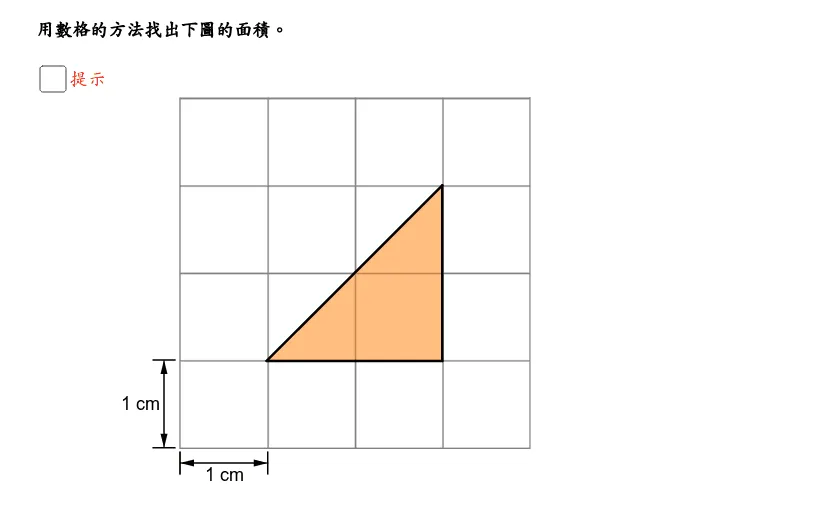
This GeoGebra applet is an interactive area calculation exercise specifically designed for Primary 4 students. It serves as a dynamic digital manipulative that transforms abstract geometric concepts into tangible, visual experiences. Utilizing geometric tools such as polygon construction, shape rotation, and vector translations, the applet demonstrates the fundamental mathematical principle of conservation of area. It visually illustrates how to dissect complex, irregular composite shapes or combine smaller fragmented pieces into familiar, basic polygons like isosceles triangles, rectangles, and parallelograms. By showing that the total area remains constant regardless of how a shape is rearranged, students grasp the underlying logic behind standard area formulas rather than just memorizing them. In this interactive environment, students can actively engage with the geometric figures. They can drag vertices to reshape polygons, use rotation tools to turn shapes around specific pivot points, and apply vector translations to slide pieces across the canvas. These hands-on interactions allow learners to experiment with different dissection and composition strategies. For instance, a student might slice a complex polygon into two right triangles and a rectangle, or rotate a triangular section to complete a larger, easily calculable square. The immediate visual feedback provided by the interface ensures that students can instantly verify whether their rearranged shapes fit together perfectly without gaps or overlaps. The primary aim of this exercise is to help students intuitively understand area calculation principles and reinforce their mastery of polygon area formulas. By physically manipulating the shapes on the screen, learners bridge the gap between concrete visual perception and abstract mathematical reasoning. This process significantly cultivates geometric spatial imagination and enhances spatial problem-solving skills. When students encounter a challenging area problem, they will be able to mentally visualize the necessary cuts and rotations to simplify the figure. Furthermore, the interactive nature of the applet keeps young learners engaged, turning routine math practice into an exploratory puzzle-solving activity. Ultimately, this tool builds a robust foundational understanding of two-dimensional geometry, preparing students for more advanced mathematical concepts in higher grades.
In collections
Interactive Geometry: Area
Loading the math board and drawing, please wait…