
Measuring and Calculating Polygon Areas
Loading the math board and drawing, please wait…
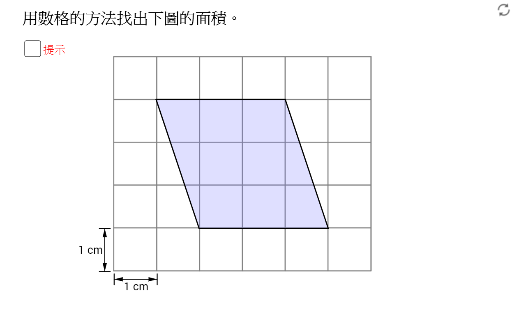
This applet demonstrates how to measure and calculate the areas of polygons. Using GeoGebra tools such as segments, vectors, points, and polygon objects, users can construct a polygon along with its related geometric elements. The applet allows students to interactively manipulate the vertices of the polygon and observe in real time how the shape changes as points are dragged. At the same time, the calculated area updates automatically, giving learners an intuitive understanding of how the dimensions of a polygon directly affect its area.
The applet integrates several key geometric concepts, including quadrilaterals, inscribed circles, and perimeter calculations. By exploring these ideas together within a single interactive environment, students can see the relationships between different properties of a polygon. For example, they can investigate how changing the shape of a quadrilateral while keeping certain side lengths fixed alters both its area and its perimeter. They can also examine the inscribed circle of a polygon and explore how the radius of that circle relates to the polygon's area and side lengths.
This hands-on, visual approach supports active learning in geometry. Rather than passively memorizing formulas, students discover patterns and connections through exploration. They can test hypotheses, make predictions, and verify their results immediately on the screen. This process helps build deeper conceptual understanding and strengthens problem-solving skills.
The applet is well suited for classroom instruction as well as independent study. Teachers can use it to introduce the concept of polygon area, demonstrate different methods of calculation, and guide students through guided discovery activities. It is equally valuable for students who want to review and reinforce their knowledge of geometry at their own pace.
Overall, Measuring and Calculating Polygon Areas provides a dynamic and engaging way to explore one of the fundamental topics in Euclidean geometry. By combining construction, measurement, and calculation in an interactive format, the applet helps students develop both intuition and rigor in their understanding of polygon properties.
GeoGebra Commands & Parameters
Segment(X0, X0 + (0, 0.25)) → gSegment(X0, X0 + (0, mark)) → hSegment(X0 + (1, 0), X0 + (1, mark)) → iVector(X0 + (0, mark / 2), X0 + (1, mark / 2)) → uVector(X0 + (1, mark / 2), X0 + (0, mark / 2)) → vSegment(Y0 - (mark, 0), Y0) → jSegment(Y0 - (mark, 1), Y0 - (0, 1)) → kVector(Y0 - (mark / 2, 1), Y0 - (mark / 2, 0)) → wVector(Y0 - (mark / 2, 0), Y0 - (mark / 2, 1)) → zPoint(yAxis) → APoint(xAxis) → BPoint(xAxis) → CPoint(xAxis) → ETranslate(A, Vector[(t1 * Vector[A, D])]) → A'Translate(B, Vector[(t1 * Vector[A, D])]) → B'Translate(F, Vector[(t1 * Vector[A, D])]) → F'Polygon(A', B', F') → poly1, f', a', b'Translate(C, Vector[(t2 * Vector[D, A])]) → C'Translate(D, Vector[(t2 * Vector[D, A])]) → D'Translate(E, Vector[(t2 * Vector[D, A])]) → E'Polygon(C', D', E') → poly2, e', c', d'Polygon(A', B', F') → poly1', f'_1, a'_1, b'_1Polygon(C', D', E') → poly2', e'_1, c'_1, d'_1Polygon(B, E, D, F) → poly3, b, e, d, fPolygon(A, B, C, D) → poly4, a, b_1, c, d_1Polygon(A, B, F) → poly5, f_1, a_1, b_2Polygon(C, D, E) → poly6, e_1, c_1, d_2
AI Drawing Prompt Reference
Draw a polygon to demonstrate how to measure and calculate its area. Start by constructing a quadrilateral, labeling its vertices and sides, then show how dragging the vertices changes the shape while dynamically updating the area. Add an inscribed circle and perimeter calculations to observe the effects of vertex changes on area and perimeter. Finally, draw multiple related polygons to illustrate their geometric relationships and transformations.
The prompt above was compiled from the original drawing commands and is for reference only.