
Measurement and Classification of Angles
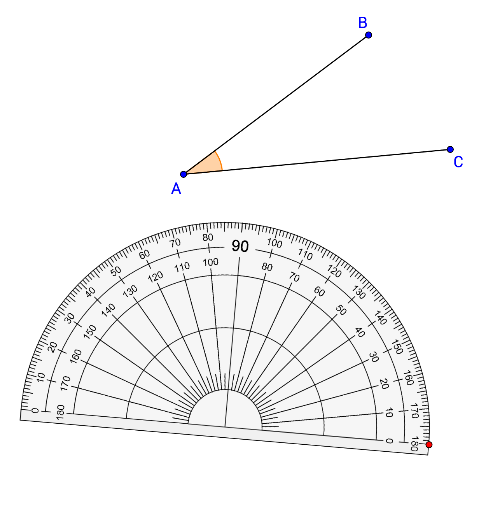
Loading the math board and drawing, please wait…
This interactive applet demonstrates how to measure angles using a protractor and classify them into categories such as acute, right, obtuse, straight, and reflex angles. Through hands-on interaction, users can explore how angles are formed, practice the correct technique for using a protractor, and observe at a glance how angles are categorized based on their degree measures. The applet allows learners to manipulate rays and adjust angle sizes dynamically, providing an intuitive visual experience of angle formation and transformation. Students receive immediate feedback as they practice reading angle measurements, reinforcing their understanding of degree notation and protractor alignment. Key concepts covered include the definition of an angle, the parts of a protractor, the process of measuring an angle from its vertex and sides, and the distinguishing features of each angle category. An acute angle measures less than 90 degrees, a right angle measures exactly 90 degrees, an obtuse angle falls between 90 and 180 degrees, a straight angle equals 180 degrees, and a reflex angle exceeds 180 degrees but remains below 360 degrees. This resource is well suited for middle school introductory geometry instruction, helping students develop a clear conceptual framework for angles and their measurement. By combining visual exploration with active participation, the applet supports diverse learning styles and encourages experimentation. It is an effective teaching aid for classroom demonstrations, independent practice, or homework reinforcement, enabling students to build confidence in angle-related skills that form the foundation for more advanced geometric reasoning.
GeoGebra Commands & Parameters
Point(Circle[P, 5]) → QPolygon(P, Q, G, D, E, F, Q, P) → poly1, a, b, c, d, e, f, b_1, a_1Segment(A, B) → s1Segment(A, C) → s2Angle(C, A, B) → αRay(A, B) → r1Ray(A, C) → r2If(P ≟ A, Line[P, C]) → L2ClosestPoint(L2, Q) → H2If(P ≟ A, Line[P, B]) → L1ClosestPoint(L1, Q) → H1If((angle > 0°) ∧ (angle < 90°), 1, angle ≟ 90°, 2, (angle > 90°) ∧ (angle < 180°), 3, angle ≟ 180°, 4, (angle > 180°) ∧ (angle < 270°), 5) → Cat
AI Drawing Prompt Reference
Draw a diagram containing multiple angles, including acute, right, obtuse, straight, and reflex angles. The diagram includes a circle with center P and radius 5 units. Select a point Q on the circle and draw a polygon with any number of sides containing point Q. Draw two line segments s1 and s2 connecting points A and B, and A and C. Draw two rays r1 and r2 extending from points A and C. Draw two lines L1 and L2, if point P is equal to point A, then L1 is the line segment connecting P and B; otherwise L1 is the line segment connecting P and C; similarly L2 is the line segment connecting P and C or P and B. Find the closest points H1 and H2 from point Q to lines L1 and L2. Classify angle α into acute, right, obtuse, straight, or reflex angle based on its size.
The prompt above was compiled from the original drawing commands and is for reference only.