
Interactive Exercise on Triangle Congruence: Question 5
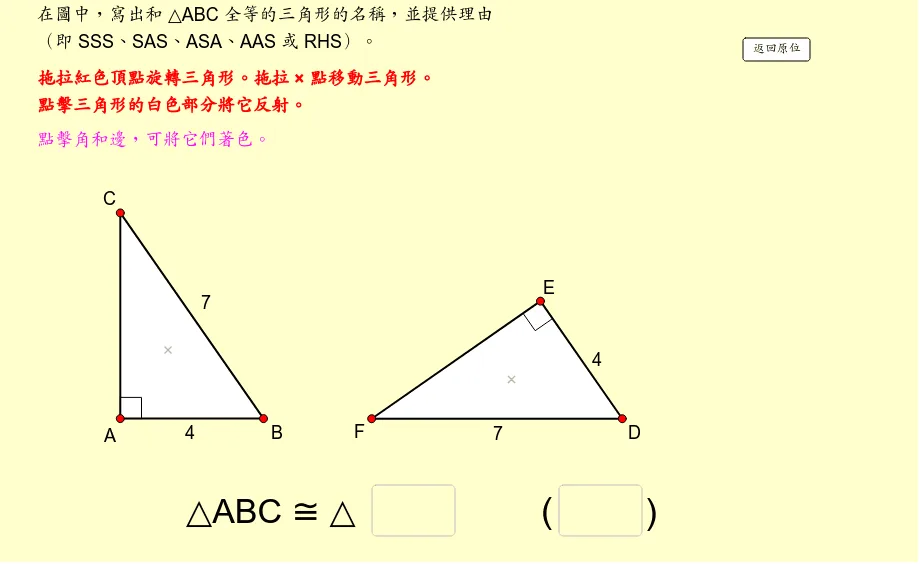
This GeoGebra applet is an interactive exercise on triangle congruence, specifically designed as Question 5 in a series. It constructs two triangles along with their corresponding sides and angles, clearly labeling each element so students can easily identify which parts correspond to one another. Through geometric transformations such as rotation, the applet visually demonstrates how one triangle can be mapped onto the other, allowing students to see in real time how the two figures coincide perfectly when they are congruent. This dynamic visualization reinforces the intuition behind congruence: that congruent triangles have exactly the same size and shape, regardless of their orientation or position on the plane. In addition to the visual demonstration, the applet incorporates interactive text input fields where students can type in their answers, selecting or writing the appropriate congruence criterion—such as Side-Side-Side (SSS), Side-Angle-Side (SAS), Angle-Side-Angle (ASA), or Hypotenuse-Leg (HL)—to justify why the two triangles are congruent. Upon submission, the applet provides immediate feedback, enabling learners to self-assess and correct their reasoning on the spot. This combination of visual exploration and active engagement makes the applet a powerful teaching tool for middle school mathematics classrooms. It helps students move beyond rote memorization of congruence theorems and develop a deeper conceptual understanding of what triangle congruence means geometrically. Teachers can use this resource as a warm-up activity, a practice exercise, or a formative assessment to gauge student comprehension of triangle congruence criteria.
In collections
Congruent Triangles
Loading the math board and drawing, please wait…