
Grade 4 Area Fun Problem: Polygon Area and Perpendicular Line Construction
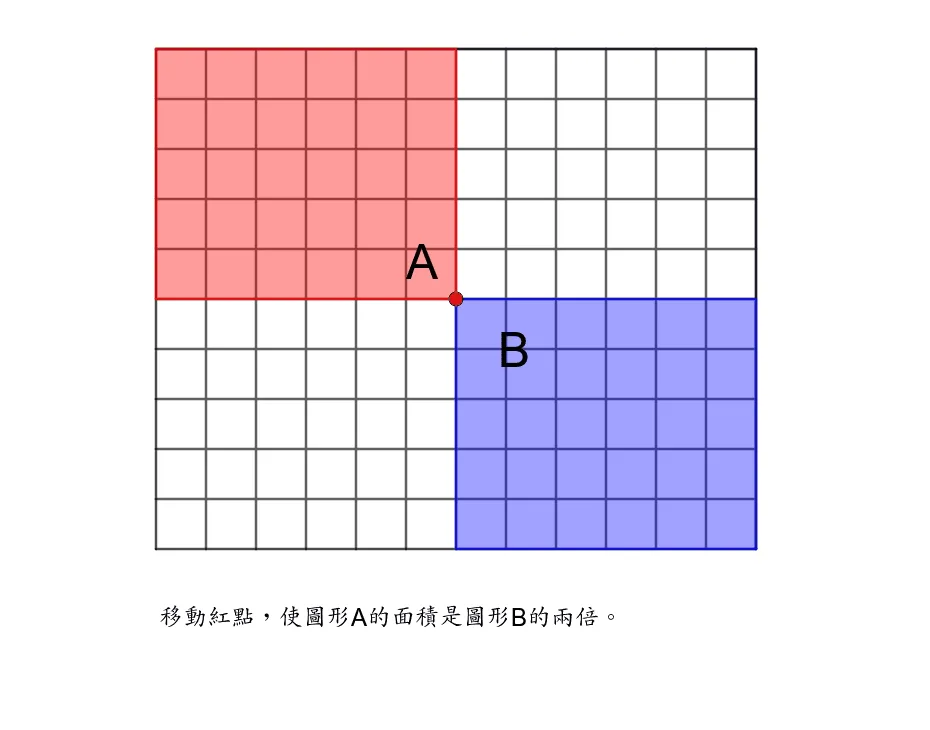
This GeoGebra example is designed for 4th-grade students to explore fun area-related math problems. It uses the Polygon command to construct polygons, OrthogonalLine to draw perpendicular lines, Intersect to find intersection points, and Sequence to generate sequential figures. The applet dynamically demonstrates polygon area calculation methods and congruence relationships through multiple geometric objects and text annotations. Students can interact with the construction by dragging vertices, toggling visibility of helper lines, and observing how area and perimeter change in real time. The perpendicular line constructions help learners understand the relationship between height, base, and area in various polygon shapes. Through the sequence feature, students can compare multiple related polygons side by side and discover patterns in their areas. The visual representation makes abstract geometric concepts concrete and accessible. Children learn how to decompose complex polygons into simpler shapes such as triangles and rectangles to calculate total area. The applet reinforces key concepts including the formula for the area of a triangle, properties of perpendicular lines, and the principle that congruent figures have equal areas. Text labels provide clear mathematical notation alongside each geometric element, supporting early math literacy. Interactive sliders allow students to modify dimensions and immediately see the effect on area and perimeter, promoting exploratory and inquiry-based learning. This hands-on approach helps young learners build spatial reasoning skills and develop intuition for geometric relationships before encountering formal proofs. The combination of dynamic visualization and guided exploration makes this an effective teaching tool for classroom instruction or independent practice.
Loading the math board and drawing, please wait…