
Geoboard Area 4
Loading the math board and drawing, please wait…
In collections
Geoboard Area
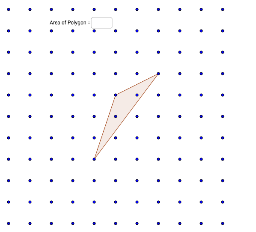
This example demonstrates constructing shapes with an area of 4 using a geoboard. Key mathematical concepts include integers and geometric construction. Using GeoGebra commands like Polygon, Textfield, and Area, one can construct polygons and calculate their areas. Suitable for middle school and above students learning geometric construction and area calculation.
GeoGebra Commands & Parameters
Polygon(D, E_3, J_3) → poly1, j_1, d, e_3Textfield() → InputBox1Area(poly1) → polyArea
AI Drawing Prompt Reference
Construct a polygon with an area of 4 by placing vertices on the grid points and connecting them with a rubber band. First, select four grid points as the vertices of the polygon and connect them to form a polygon. Then, enter the area of the polygon in the input box and confirm it is 4.
The prompt above was compiled from the original drawing commands and is for reference only.